.png)
|
🚀 Release Highlights |
The August 2026 release brings partner-account support to Mavvrik MCP Server, expands AI Assist with seat utilization tracking, and adds JavaScript/TypeScript SDK support, OpenTelemetry-based agent cost ingestion, n8n agent cost governance, and custom agent pricing. Platform improvements include Advanced Savings Recommendations (Beta), manual Unit Economics dimension inputs, and Savings commitment tenure controls.
For more details, please reach out to your Mavvrik representative or check our updated documentation Help Center
|
Release Version |
Features |
|---|---|
|
Release-2026.08.12 |
AI for FinOps
FinOps for AI
Platform Improvements
|
🤖 AI for FinOps
|
Bring AI into your everyday FinOps work. |
Mavvrik MCP Server Enhancements
Use MCP across partner accounts and more areas of the Mavvrik platform.
If you manage multiple customer tenants, you can now use Mavvrik MCP to ask cost and usage questions across your managed tenants — focused on one customer tenant by name, or rolled up across all of them — without switching between dashboards during an investigation.
MCP coverage has also expanded into more Mavvrik areas, including Budgets, Perspectives, Teams, Users, Cloud Accounts, AI Accounts, SaaS Accounts, and Agentic Pricing, so you can query more tenant data directly through your supported AI client.
To Connect Mavvrik MCP with Cursor refer Cursor
To Connect Mavvrik MCP with ChatGPT refer ChatGPT
To Connect Mavvrik MCP with Microsoft 365 Copilot refer M365 Copilot
To Connect Mavvrik MCP with Claude refer Claude
🧾 FinOps for AI
|
Govern AI assistant and agent spend like any other cost. |
AI Assist Seat Utilization
Track assigned, active, and idle seats for AI Assist tools.
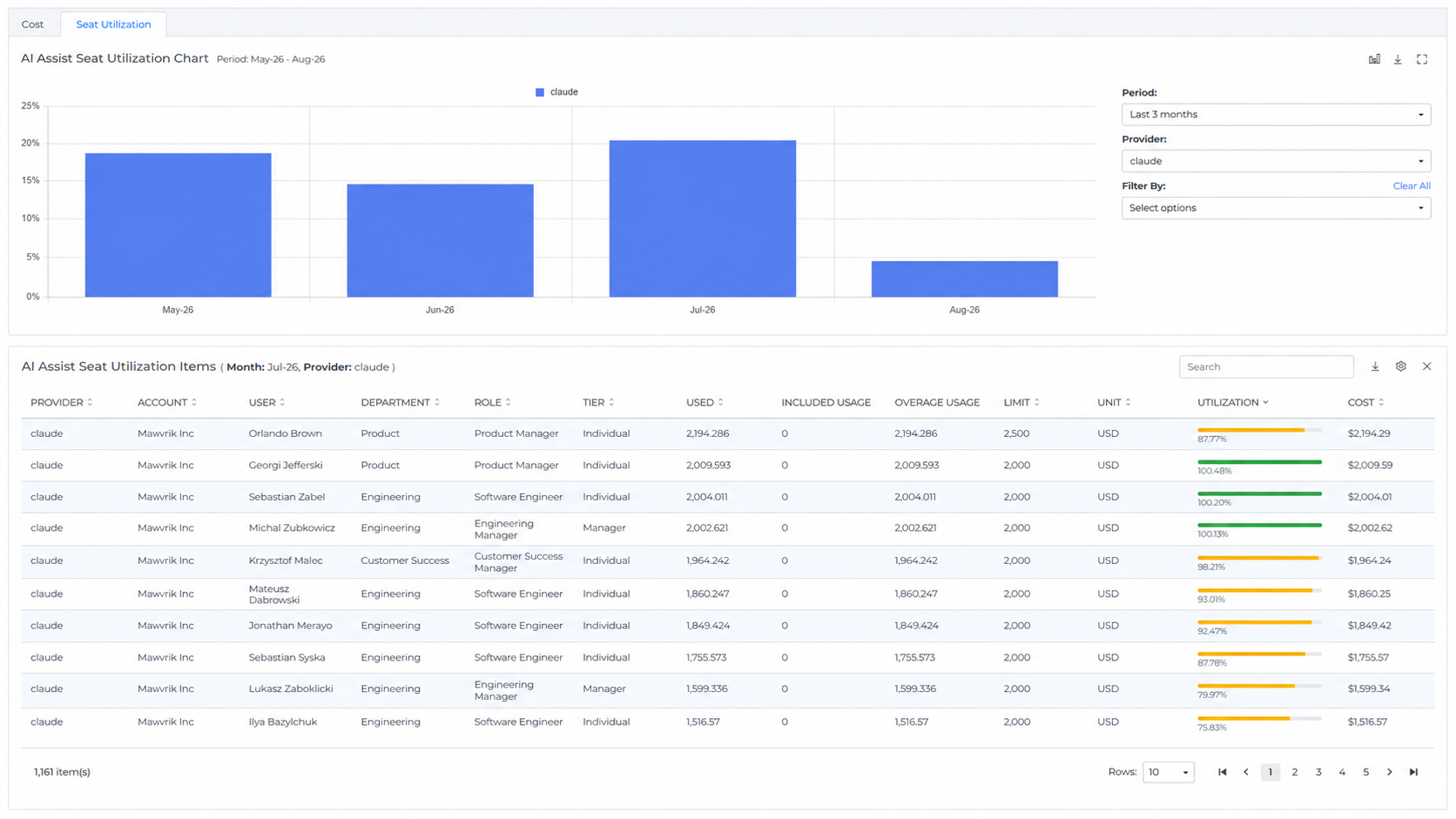
Building on the existing AI Assist cost visibility, you can now monitor seat utilization for AI Assist tools such as GitHub Copilot and Claude. The AI Assist Cost page now shows seat usage alongside spend, so you can see how many seats are assigned, how many are active, and where seats are sitting unused — and right-size licenses accordingly.
Agentic AI: JavaScript / TypeScript SDK Support
Extend Agentic cost observability to JavaScript and TypeScript agent stacks.
Agentic AI already supports Python based agent workloads. With this release, support extends to JavaScript / TypeScript, giving you the same cost observability for agent stacks on Node.js 18+/20+, Bun, or Deno — including detailed cost and usage tracking, trace correlation, and router-aware cost accounting.
Agent Cost via LiteLLM & Langfuse
Bring agent cost and usage into Mavvrik using existing telemetry traces.
If you already instrument AI agents using LiteLLM and Langfuse, you can now send traces from these sources into Mavvrik platform without the Mavvrik SDK. You get agent cost, usage, and trace-level activity in Mavvrik using the telemetry you already produce..
Cost Governance for n8n Agents
Track and govern the cost of AI agents built with self-hosted n8n.
If you build AI agents on self-hosted n8n, you can now bring those agents into Mavvrik cost governance. Cost and usage from n8n-based agents are captured in Mavvrik, so you can manage n8n agent spend alongside your other agent workloads and keep AI agent costs visible wherever the agents are built.
Custom Pricing for Agents
Define custom LLM pricing for AI agents.
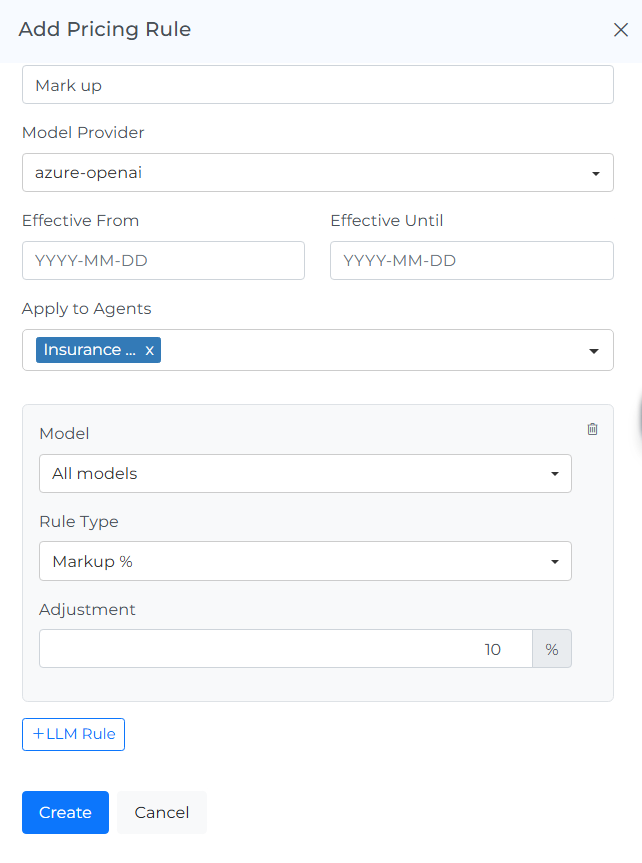
You can now set custom pricing for agent workloads directly in Mavvrik, so agent cost reflects your actual commercial terms when negotiated LLM rates, or metered usage differ from standard pricing.
Pricing can be defined for LLM models, and applied at the agent level, with more specific pricing taking precedence over broader pricing. Published pricing applies to matching agent usage from its effective date.
⚙️ Platform Improvements
|
Deeper savings coverage and platform refinements. |
Advanced Savings Recommendations BETA
Identify deeper savings opportunities across AWS, Azure, and GCP.
Advanced Savings Recommendations help you uncover savings that standard checks miss — spanning idle and orphaned resources, oversized workloads, inefficient architecture, and commitment or reservation pricing. Every finding rolls up into a single savings figure, so you can see the full opportunity across AWS, Azure, and GCP at a glance and act on the biggest wins first.
This feature, customised for your data and needs, is in beta. Contact your Customer Success Manager for details.
Unit Economics : Manual Dimension Inputs
Start using Unit Economics before your data sources are connected.
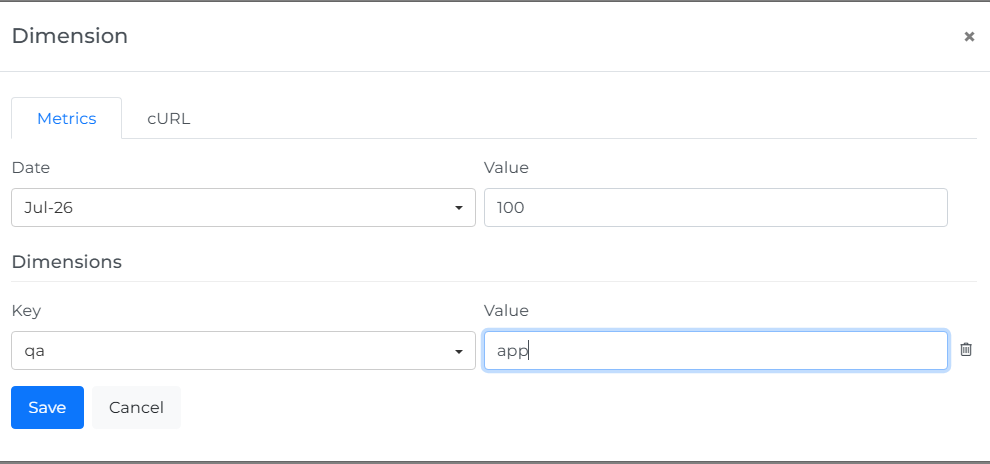
You can now enter Unit Economics dimension values manually by month, as an alternative to connecting external data sources — a faster way to start using Unit Economics when source data isn't yet connected or automated.
Savings : Commitment Tenure
Compare commitment cost and savings by tenure directly in the Savings dashboard.
The Commitment Tenure option now updates the Savings summary widgets based on the selected term, such as 1 Year or 3 Years, so you can compare commitment cost and potential savings by tenure while still reviewing all commitment recommendations in the table.