.png)
Overview
Unit Economics solution is designed to quantify the total cost associated with delivering products or services to customers.
Why this matters: a cost allocation tells you what a segment cost in total, but it doesn't answer "what does it cost us to serve one customer, one region, or one execution", and that second question is what actually drives pricing and profitability decisions. Unit Economics takes an allocated cost, divides it by a volume metric you supply (calls, executions, whatever makes sense for the business), and produces a per-unit cost that can then be applied to any dimension you care about: customer, location, or both.
This shows up differently depending on your role:
-
Finance/pricing teams use this to understand whether a customer or segment is actually profitable once their share of shared/indirect costs is factored in, not just their direct costs.
-
FinOps managers use this to translate raw cost allocation numbers into a metric that's meaningful to the business side of the conversation.
-
Engineering/product teams use the Unit Metric API to feed in the volume data (API calls, executions, requests) that the unit cost gets applied against.
Steps to create Unit Economics
-
Cost Gathering / Allocation
-
Create a cost allocation that includes direct and indirect/shared components (segments) of the costs to arrive to a Total Cost of the allocation
-
-
Cost Splitting
-
Identify the cost splitting i.e. identify the cost that you wanted to split segments in unit Cost ( per execution )
-
-
Unit Economics
-
Calculate the cost that can be served for the segment ( per dimension, e.g. Customer )
-
Below are examples of cost gathering, cost splitting, and calculating Unit Economics
Example 1: No Dimension
-
Identify the unit metrics that you want to apply, as shown below
|
Month |
# of Calls |
|---|---|
|
2025-01-01 |
400 |
|
2025-02-01 |
200 |
-
Cost Allocation: Total Cost of cost allocation in a Month, e.g. consisting: direct, shared, etc.
|
Month |
Total Cost |
|---|---|
|
2025-01-01 |
1000 |
|
2025-02-01 |
600 |
-
Cost Splitting: Unit Cost of running on allocation per Execution:
|
Month |
Unit Cost |
|---|---|
|
2025-01-01 |
1000 / 400 = 2.5 |
|
2025-02-01 |
600 / 200 = 3 |
-
Unit Economics: N/A
Unit Metric API to post via Postman
Use the auto-generated command instead of hand-writing one: the request shape below is illustrative only; it uses a legacy endpoint path and omits authentication. For a ready-to-run command with your tenant's real endpoint, the segment's actual ID, and the required API key already filled in, open the segment's ⋮ menu → View Metrics → the cURL tab, and copy that command directly. This applies to all three worked examples on this page.
curl -X POST 'https://api.mavvrik.ai/<tenant slug>/unit-economics/<segment id>/metrics' \
--header 'Content-Type: application/json' \
--header 'x-api-key: <your API key>' \
--data '{
    "metrics": [
        {
            "date": "2025-01-01", /* will be aggregated to month */
            "value": 400
        },
        {
            "date": "2025-02-01",
            "value": 200
        }
    ]
}'
Example 2: Single Dimension
-
Units BY Customer, with the following Unit Metric input:
|
Month |
Customer |
# of Calls |
|---|---|---|
|
2025-01-01 |
Customer A |
100 |
|
2025-01-01 |
Customer B |
300 |
|
2025-02-01 |
Customer A |
100 |
|
2025-02-01 |
Customer B |
100 |
-
Cost Allocation: Total Cost of cost allocation in a Month, e.g. consisting: direct, shared, etc.
|
Month |
Total Cost |
|---|---|
|
2025-01-01 |
1000 |
|
2025-02-01 |
600 |
-
Cost Splitting: Unit Cost of running on allocation per Execution:
|
Month |
Unit Cost |
|---|---|
|
2025-01-01 |
1000 / 400 = 2.5 |
|
2025-02-01 |
600 / 200 = 3 |
-
Unit Economics: Serving Cost of running on allocation per Dimension:
|
Month |
Customer |
# of Calls |
Unit Economics |
|---|---|---|---|
|
2025-01-01 |
Customer A |
100 |
2.5 * 100 = 250 |
|
2025-01-01 |
Customer B |
300 |
2.5 * 300 = 750 |
|
2025-02-01 |
Customer A |
100 |
3 * 100 = 300 |
|
2025-02-01 |
Customer B |
100 |
3 * 100 = 300 |
Unit Metric API to post via Postman
curl -X POST 'https://api.mavvrik.ai/<tenant slug>/unit-economics/<segment id>/metrics' \
--header 'Content-Type: application/json' \
--header 'x-api-key: <your API key>' \
--data '{
    "metrics": [
        {
            "date": "2025-01-01", /* will be aggregated to month */
            "dimensions": [
              { "key": "customer", "value": "Customer A" }
            ],
            "value": 100
        },
        {
            "date": "2025-01-01",
            "dimensions": [
              { "key": "customer", "value": "Customer B" }
            ],
            "value": 300
        },
        {
            "date": "2025-02-01",
            "dimensions": [
              { "key": "customer", "value": "Customer A" }
            ],
            "value": 100
        },
        {
            "date": "2025-02-01",
            "dimensions": [
              { "key": "customer", "value": "Customer B" }
            ],
            "value": 100
        }
    ]
}'
Example 3: Multi Dimensions
-
Units BY Customer and Location, with the following Unit Metric input:
|
Month |
Customer |
Location |
# of Calls |
|---|---|---|---|
|
2025-01-01 |
Customer A |
US |
60 |
|
2025-01-01 |
Customer A |
EU |
40 |
|
2025-01-01 |
Customer B |
US |
200 |
|
2025-01-01 |
Customer B |
EU |
100 |
|
2025-02-01 |
Customer A |
US |
30 |
|
2025-02-01 |
Customer A |
EU |
70 |
|
2025-02-01 |
Customer B |
US |
25 |
|
2025-02-01 |
Customer B |
EU |
75 |
-
Cost Allocation: Total Cost of cost allocation in a Month, e.g. consisting: direct, shared, etc.
|
Month |
Total Cost |
|---|---|
|
2025-01-01 |
1000 |
|
2025-02-01 |
600 |
-
Cost Splitting: Unit Cost of running on allocation per Execution:
|
Month |
Unit Cost |
|---|---|
|
2025-01-01 |
1000 / 400 = 2.5 |
|
2025-02-01 |
600 / 200 = 3 |
-
Unit Economics: Serving Cost of running on allocation per Dimension:
|
Month |
Customer |
Location |
# of Calls |
Unit Economics |
|---|---|---|---|---|
|
2025-01-01 |
Customer A |
US |
60 |
2.5 * 60 = 150 |
|
2025-01-01 |
Customer A |
EU |
40 |
2.5 * 40 = 100 |
|
2025-01-01 |
Customer B |
US |
200 |
2.5 * 200 = 500 |
|
2025-01-01 |
Customer B |
EU |
100 |
2.5 * 100 = 250 |
|
2025-02-01 |
Customer A |
US |
30 |
3 * 30 = 90 |
|
2025-02-01 |
Customer A |
EU |
70 |
3 * 70 = 210 |
|
2025-02-01 |
Customer B |
US |
25 |
3 * 25 = 75 |
|
2025-02-01 |
Customer B |
EU |
75 |
3 * 75 = 225 |
Unit Metric API to post via Postman
curl -X POST 'https://api.mavvrik.ai/<tenant slug>/unit-economics/<segment id>/metrics' \
--header 'Content-Type: application/json' \
--header 'x-api-key: <your API key>' \
--data '{
    "metrics": [
        {
            "date": "2025-01-01", /* will be aggregated to month */
            "dimensions": [
              { "key": "customer", "value": "Customer A" },
              { "key": "location", "value": "US" }
            ],
            "value": 60
        },
        {
            "date": "2025-01-01",
            "dimensions": [
              { "key": "customer", "value": "Customer A" },
              { "key": "location", "value": "EU" }
            ],
            "value": 40
        },
        {
            "date": "2025-01-01",
            "dimensions": [
              { "key": "customer", "value": "Customer B" },
              { "key": "location", "value": "US" }
            ],
            "value": 200
        },
        {
            "date": "2025-01-01",
            "dimensions": [
              { "key": "customer", "value": "Customer B" },
              { "key": "location", "value": "EU" }
            ],
            "value": 100
        },
        {
            "date": "2025-02-01",
            "dimensions": [
              { "key": "customer", "value": "Customer A" },
              { "key": "location", "value": "US" }
            ],
            "value": 30
        },
        {
            "date": "2025-02-01",
            "dimensions": [
              { "key": "customer", "value": "Customer A" },
              { "key": "location", "value": "EU" }
            ],
            "value": 70
        },
        {
            "date": "2025-02-01",
            "dimensions": [
              { "key": "customer", "value": "Customer B" },
              { "key": "location", "value": "US" }
            ],
            "value": 25
        },
        {
            "date": "2025-02-01",
            "dimensions": [
              { "key": "customer", "value": "Customer B" },
              { "key": "location", "value": "EU" }
            ],
            "value": 75
        }
    ]
}'
Steps to create Unit Economics in Mavvrik portal
-
Log into Mavvrik
-
Click on the menu
-
Click on unit economics under operate
-
Click on +Unit Economics
-
Fill in the details and click on create
-
Unit Economics entry is created
-
Click on the created Unit Economics entry
-
Click on +segment
-
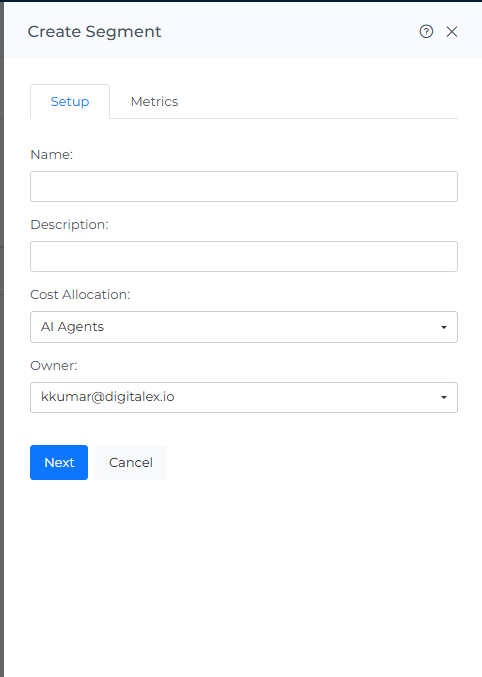
Select the Cost allocation to which you want to apply the unit economics and click on Next
-
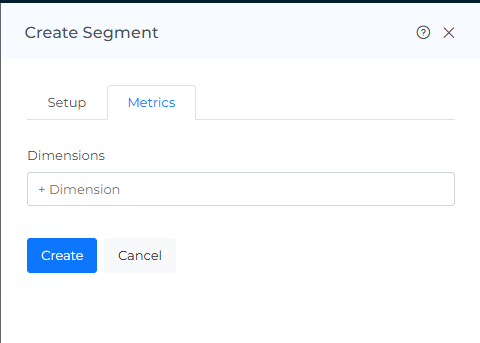
Enter the dimensions you have calculated in the cost splitting step and click on Create
-
You will see below
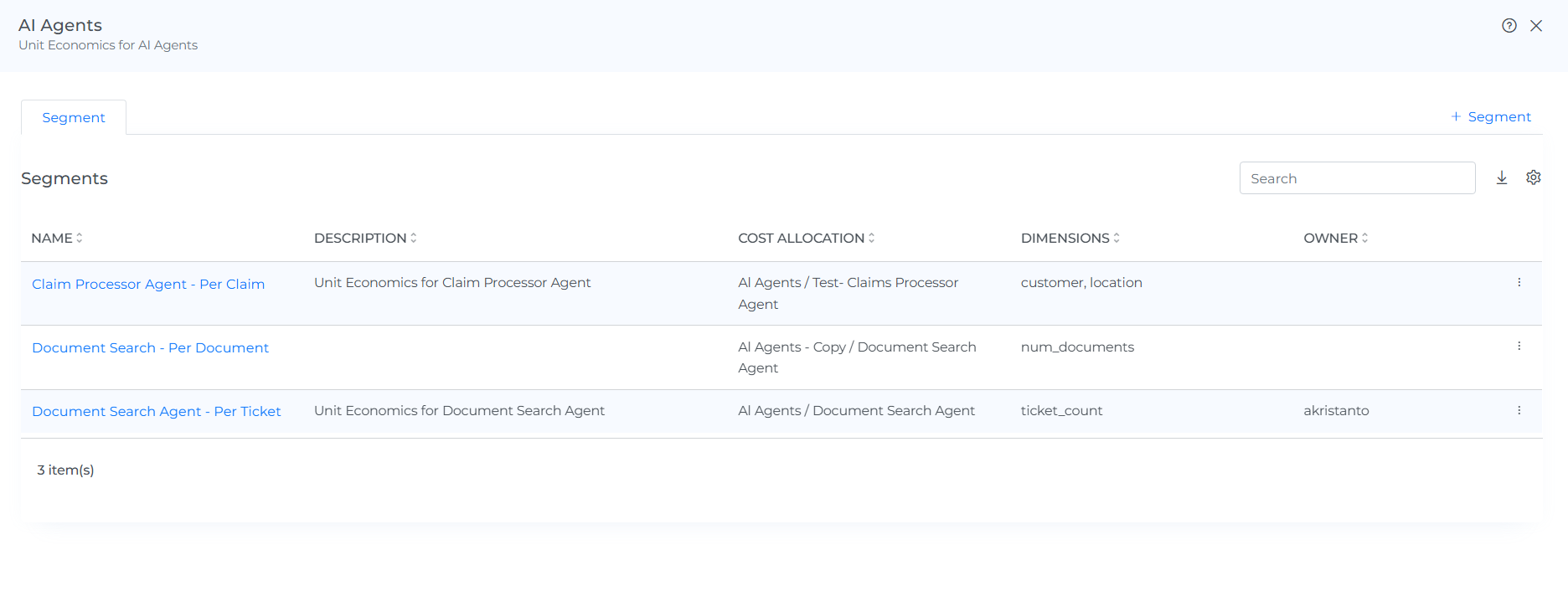
List columns: the Unit Economics list (Operate > Unit Economics) shows Name (a deep-link into the entry), Description, Owner, and Teams, plus an Action column (Edit/Delete). Inside an entry, the Segments list shows Name, Description, Cost Allocation, Dimensions (the dimension keys configured for that segment), and Owner, plus an Action column (Edit/Delete/View Metrics).
-
Click the three dots on the segment and select View Metrics. This opens a dialog with two tabs: Metrics and cURL.
-
To enter metrics via the UI,
-
click +Metric, select the Date, and enter the Value (the unit count for that dimension, e.g. calls or executions).
-
Select a dimension Key and enter its Value
-
Click +Dimension to add more than one dimension to the same entry
-
click Save.
-
If no metrics are added while creating the segment, the option to add a +Dimension will not be displayed when adding Metrics.
Metrics table columns: once entries exist, the Metrics tab lists them in a table with columns Date, Dimensions (shown as key:value pairs), and Value, plus an Action column (Edit/Delete).
-
Update the Unit Economics metrics calculated and post the data using Postman
-
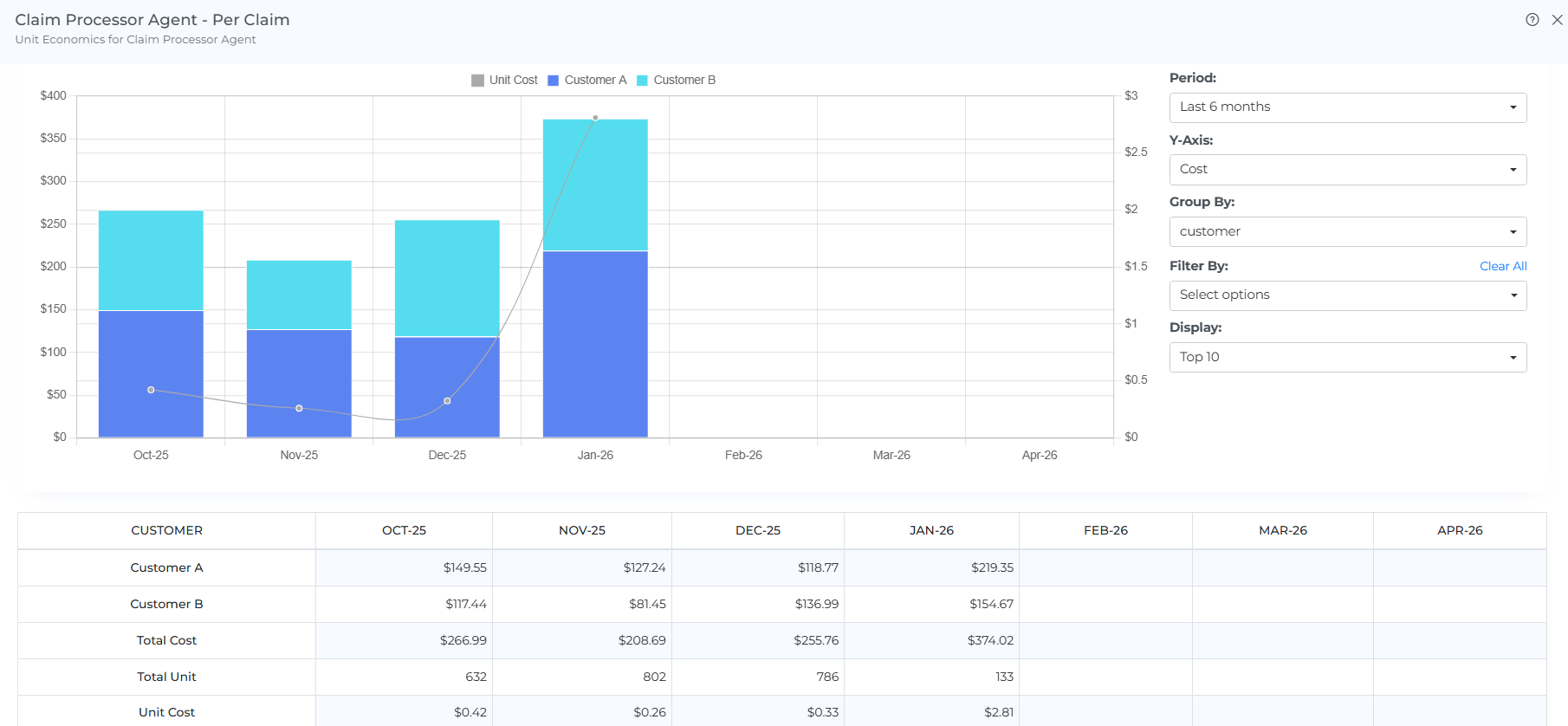
After the data is posted, you can see the data in the UI as below
Header Icons
The Unit Economics list page (and each entry's detail view) has a header toolbar with: Share (copies a link to the current page/filters), Bookmark, Subscription (see Bookmarks and Subscriptions for how these work), Screenshot (downloads the page as a PDF), Reload (clears filters/selections back to default), and Help (opens this documentation).
Troubleshooting
Metrics are missing for the month or dimension being reviewed
-
Confirm that you are viewing the intended Unit Economics entry and segment, and check the cost allocation selected for that segment.
-
Open the segment's three-dot menu and select View Metrics. Check that the required metric entries have been saved.
-
Compare each entry's Date with the month you are reviewing, and check its dimension Key and Value against the customer, location, or other dimension you expect.
-
If an entry has not been added, use +Metric to enter its date, unit count, and applicable dimension values, then click Save.
The calculated cost differs from the expected amount
-
Compare the allocated cost and metric values for the same month. Include the direct and shared cost components used by the selected allocation.
-
Check that metric Value represents the intended unit count, such as calls or executions, rather than a monetary cost.
-
Use the worked examples above to reconcile the calculation: monthly allocated cost divided by total monthly units gives the unit cost; multiplying that unit cost by a dimension's units gives its serving cost.
The Unit Metric API call is rejected or returns an error
-
Confirm the request includes an x-api-key header; a Content-Type header alone is not sufficient to authenticate.
-
Confirm the URL path matches your tenant and the specific segment you're posting to: open that segment's View Metrics → cURL tab and copy the auto-generated command rather than reusing a URL from another segment or tenant.