.png)
Mavvrik allows users to set up alerts for their cloud spend and integrate them with various channels such as Microsoft Teams, and Slack. This enables users to receive notifications about their cloud spend on the configured channels. This can help users to track their cloud expenses and ensure that they are within budget.
Why this matters: alerts and recommendations are only useful if they reach people where they already work — buried in a dashboard nobody checks proactively, a cost spike or a ticket-worthy recommendation can sit unnoticed for days. Integrations route that notification into Slack, Teams, Jira, or a webhook-based tool directly, so it shows up as part of someone's normal workflow instead of requiring a separate check-in.
This shows up differently depending on your role:
-
FinOps managers wire budget and cost alerts into Slack or Teams so spend visibility becomes part of the team's daily channel, not a separate dashboard someone has to remember to check.
-
Engineering leads route Savings recommendations into Jira via webhook so they become actionable tickets directly, without manually re-entering them into the team's tracker.
Create an Integration
-
Login to Mavvrik
-
Click on Menu Icon at the top left corner
-
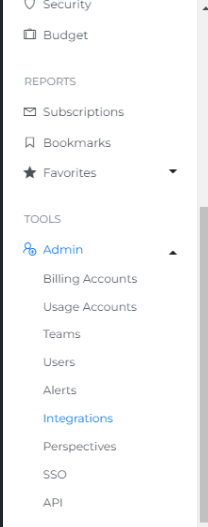
Click on Integrations under Admin
-
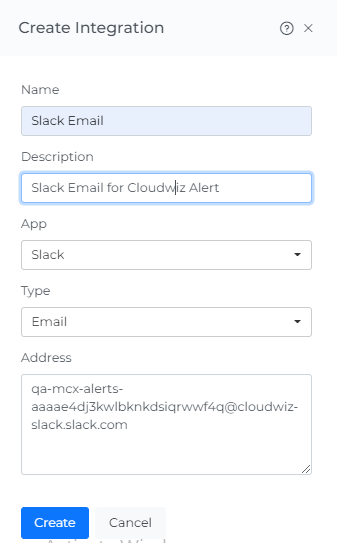
Click on Create Integration

-
Enter Name & Description
-
Select the App of your choice
-
Select the Type of your choice
-
Paste the Email / Webhook link in the Address which you have configured in your respective app
-
Click Create button
-
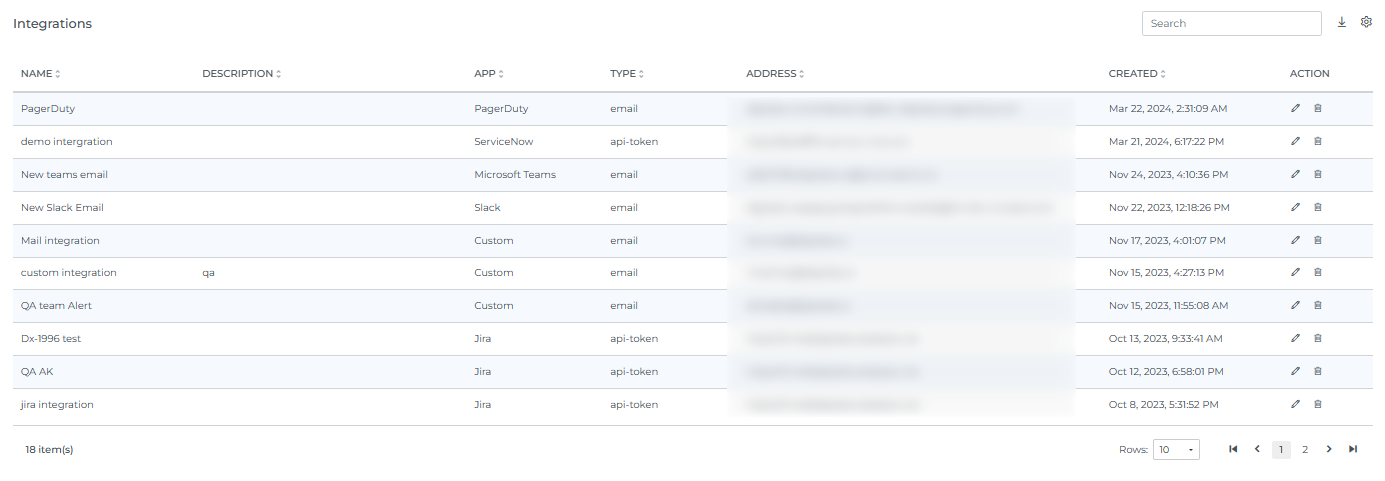
Integration is created and displayed as shown below. When you select the number of rows, you will be able to view that same quantity of rows on the page.
Troubleshooting
-
If notifications aren't arriving at the destination app, confirm the Address (email or webhook link) was copied exactly from that app and configured there first — Mavvrik doesn't validate or create the destination, so a typo or an unconfigured webhook will fail silently on the receiving end.
-
If the App you need isn't in the list, use the generic webhook Type instead — most tools not natively listed can still be reached that way.
FAQs
What do I need ready before creating an integration in Mavvrik?
The email address or webhook link, already configured on the receiving side (Slack, Teams, Jira, etc.). You set that up in the target app first, then paste it into the Address field here — Mavvrik doesn't create the destination for you.
Can I integrate with more than just Slack and Teams?
Yes — the App selection supports multiple options beyond those two, and anything not natively listed can typically still be reached via a generic webhook.