
|
Release Highlights |
Mavvrik’s November 2026 release introduces Mavvrik Agent Studio in Beta, a new agentic experience for working with your cost and usage data. The MCP Server adds governed write actions, so that connected AI clients can make changes rather than only read, and Mavvrik MCP is now available as a plugin in ChatGPT. Pricing rules now extend to AI Assist cost, and agent cost tracking expands to OpenRouter and agentgateway. The release also adds service accounts with team-scoped credentials, partner-level AI cost rollups, MACC commitment data in MCP and Reports, and SaaS Savings capabilities for Azure Databricks and Snowflake.
For more details, please reach out to your Mavvrik representative or check our updated documentation Help Center.
|
Release Version |
Features |
|---|---|
|
Release-2026.11.19 |
AI for FinOps
FinOps for AI
Platform Improvements
|
AI for FinOps
Mavvrik Agent Studio BETA
Mavvrik Agent Studio brings agentic FinOps work into one place. You can ask questions, investigate spend, and analyze usage in conversation, with answers drawn from the same data as your dashboards and reports. Access is subject to tenant rollout.
You can create agents with their own instructions, tools, and skills, schedule them for recurring reviews, and search and share conversations. Mavvrik Agent is also available from a side panel on Console pages, and agents return only the data you’re permitted to see.
Governed MCP Server Write Actions
The Mavvrik MCP Server now supports write actions, so a connected AI client can make changes in Mavvrik, not only analyze cost. You can create or update budgets, alert rules, Virtual Tags, cost allocations, reports, dashboards, and tickets, so you can go from finding an untagged workload to tagging it and raising a ticket in one session.
Before a change is saved, MCP shows a preview for your confirmation. Supported actions follow your existing Mavvrik permissions and are recorded in the audit trail.
Mavvrik Plugin for ChatGPT
Mavvrik MCP is now available as a plugin in ChatGPT, so you can connect your Mavvrik tenant directly from ChatGPT’s Plugins page without setting up a custom connector. You sign in with your Mavvrik account, and ChatGPT can then answer cost questions using your tenant’s data within your existing Mavvrik permissions.
FinOps for AI
AI Assist Pricing Rules
Pricing rules now extend to AI Assist cost, so that you can present this spend under your own commercial arrangements rather than relying on the source cost alone. Supported rule types include markups, discounts, fixed rates, and hiding selected cost entries, which matches the rule types already available for your other cost sources. This applies most directly where AI Assist spend is re-billed, such as a partner applying a managed-service margin, or a central team recovering cost from business units at an agreed rate.
Rules are applied during cost processing, and the original cost amount is retained for reference, so that the source figure remains available when you reconcile against the provider invoice.
OpenRouter Integration
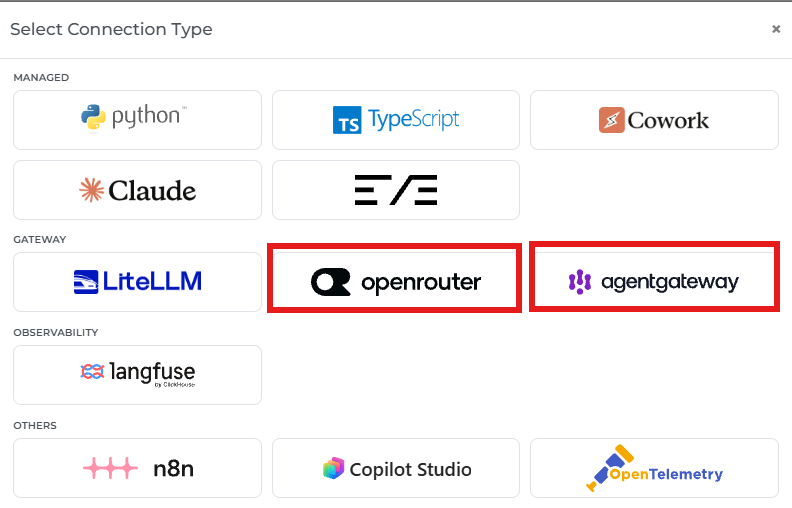
Mavvrik now supports OpenRouter as a gateway connection, so that you can track the cost of agents that call models through OpenRouter without adding the Mavvrik SDK to your code. This suits teams that adopted OpenRouter for model routing and cannot take an application change in order to begin cost attribution. Cost, tokens, model, agent, session, and user details appear in your Agentic Cost Governance views.
Requests that use your own provider keys (BYOK) are billed at $0 by OpenRouter, which would otherwise report that traffic as free. Mavvrik reports the provider's cost for those requests instead, so that BYOK usage is attributed at what it actually costs.
agentgateway Integration
Mavvrik now supports agentgateway, the open-source gateway for LLM and agent traffic, as a gateway connection, so that teams routing model calls through agentgateway can track agent cost at the gateway rather than instrumenting every application. Where several services share a single routing layer, this removes the per-service instrumentation work entirely.
Cost, tokens, model, agent, session, user, and tags appear in your Agentic Cost Governance views, including for streamed responses and requests that use prompt caching.
Platform Improvements
Service Accounts with Team-Scoped Credentials
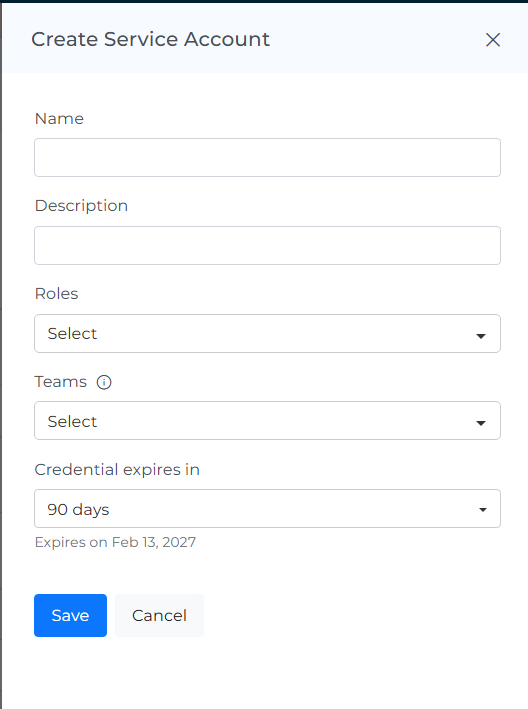
Service accounts give integrations, scripts, and reporting tools an identity of their own, so that an automated connection no longer depends on a person's credentials and does not break when that person changes role or leaves. Administrators assign roles to each service account and create credentials with expiry and rotation controls.
Team scope limits the cost data that a service account can read, so that a connection built for one business unit returns that unit's data only. This suits cases such as Power BI reporting for a single business unit, where the connection should not carry organization-wide access.
Partner-Level AI Cost Rollups
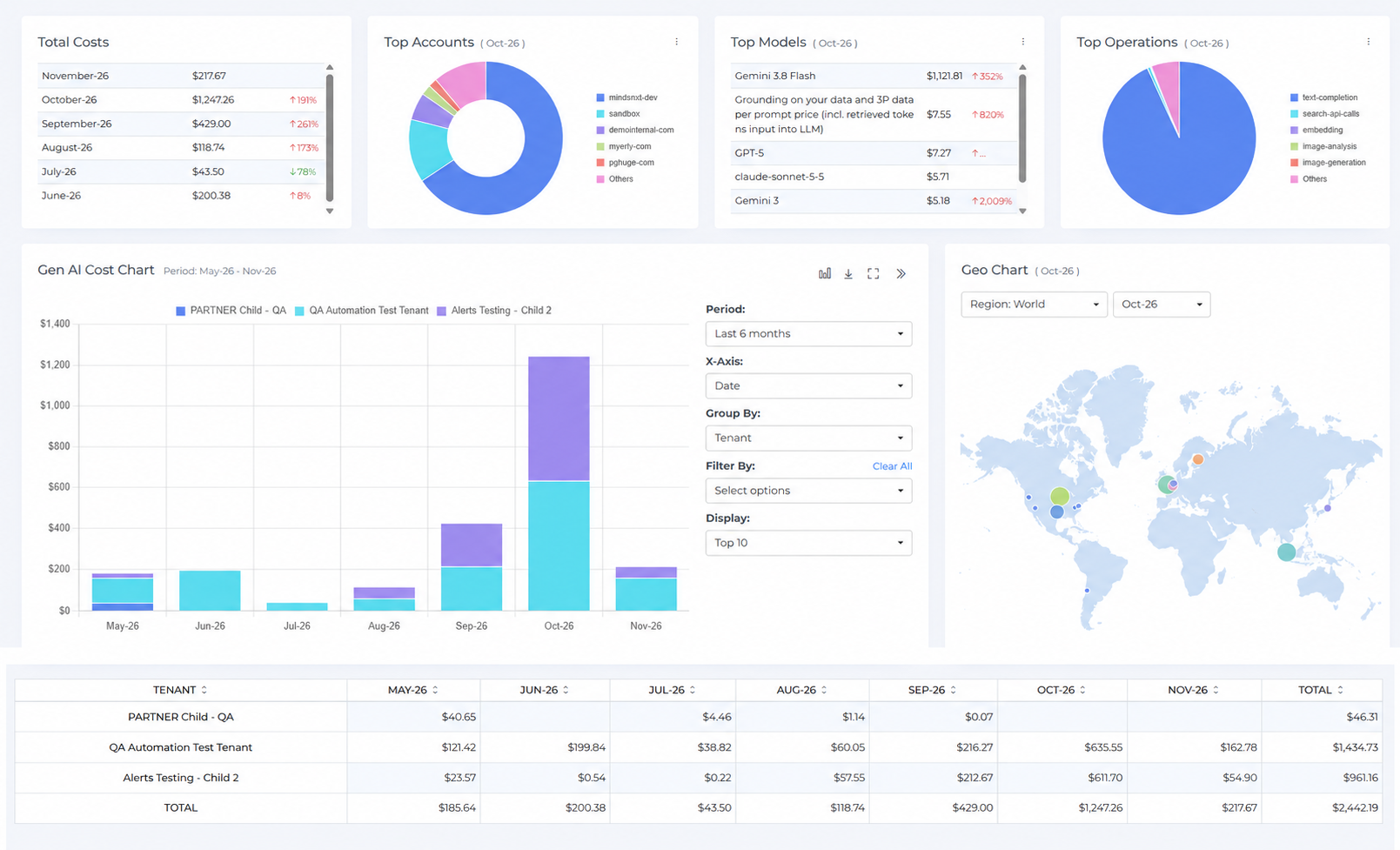
Partner tenants now see GenAI, AI Assist, and Agentic cost aggregated across the customer tenants they manage, so that a partner can assess AI spend across the full book of business without reviewing each customer separately.
The rollup covers cost trends, top accounts, models, and operations, costs by geography, and a monthly breakdown by child tenant, which supports both portfolio review and individual customer conversations from the same view. Used together with AI Assist Pricing Rules, partners can review this spend and present it at their own rates.
MACC Commitment Data in MCP and Reports
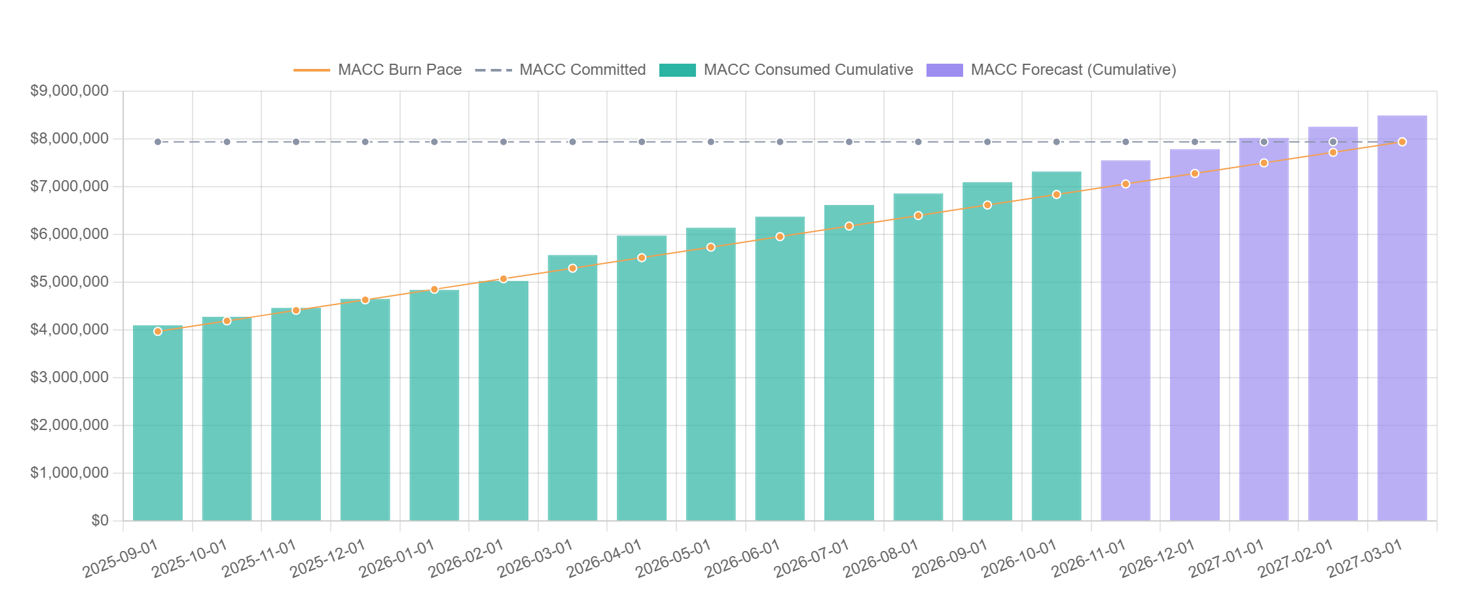
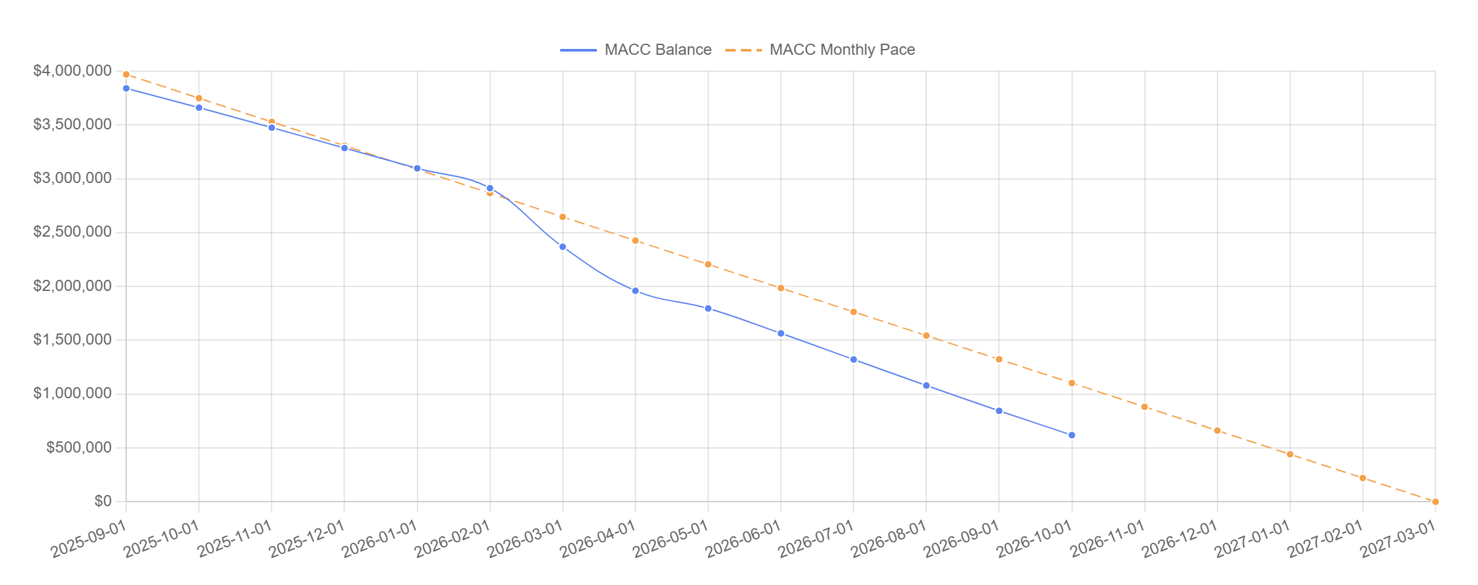
Microsoft Azure Consumption Commitment (MACC) data is now available to authorized administrators through MCP and through a MACC schema in Reports, so that commitment drawdown can be analyzed alongside your other cost data rather than tracked separately in the Azure portal. Teams managing a MACC can report burn against contract term in the same place as the rest of their commitment analysis, and include it in scheduled reporting.
Access follows your existing permissions, so that MACC data remains visible only to administrators authorized to see it.
SaaS Savings
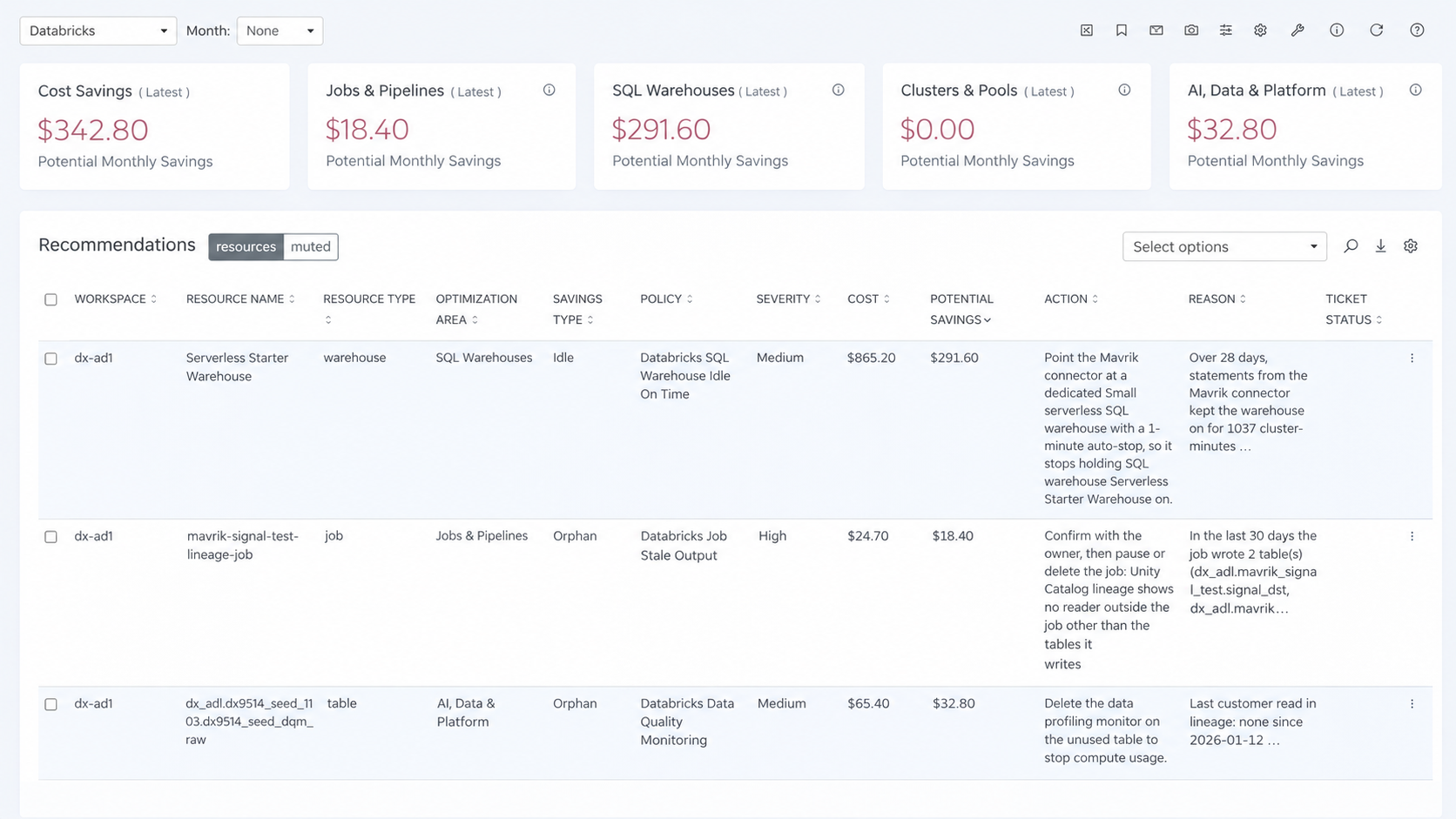
Mavvrik expands its SaaS Savings capabilities to Azure Databricks and Snowflake, helping customers identify cost optimization opportunities across their data and analytics workloads.
Azure Databricks Savings
Mavvrik now identifies savings opportunities across Azure Databricks clusters and jobs, including idle or oversized clusters, auto-termination settings, compute choices, and spot usage.
Customers can review estimated monthly savings alongside Databricks pre-purchase commitment utilization and burn pace.
Snowflake Savings
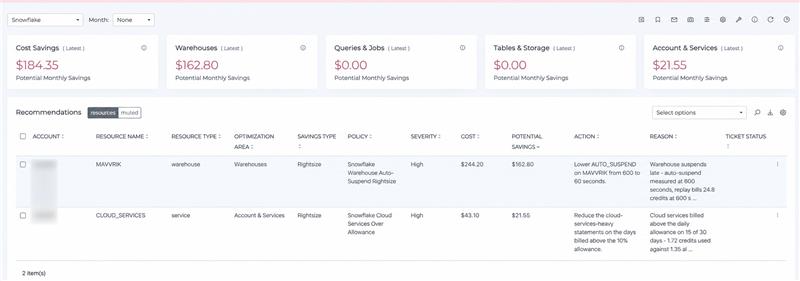
Mavvrik now supports savings opportunities for Snowflake workloads, helping customers identify potential improvements in cost efficiency and resource utilization.
These insights help teams make informed optimization decisions and manage Snowflake spending more effectively.
AWS RI and Savings Plan Recommendation Collection Improvements
Mavvrik now collects Reserved Instance and Savings Plan recommendations from AWS Cost Optimization Hub rather than AWS Cost Explorer. Recommendations remain in the same place in Mavvrik and no action is required from you.
The change reduces the AWS API charges incurred by recommendation collection, which is most noticeable in environments with a large number of AWS accounts.
Commitment Coverage KPI Averages
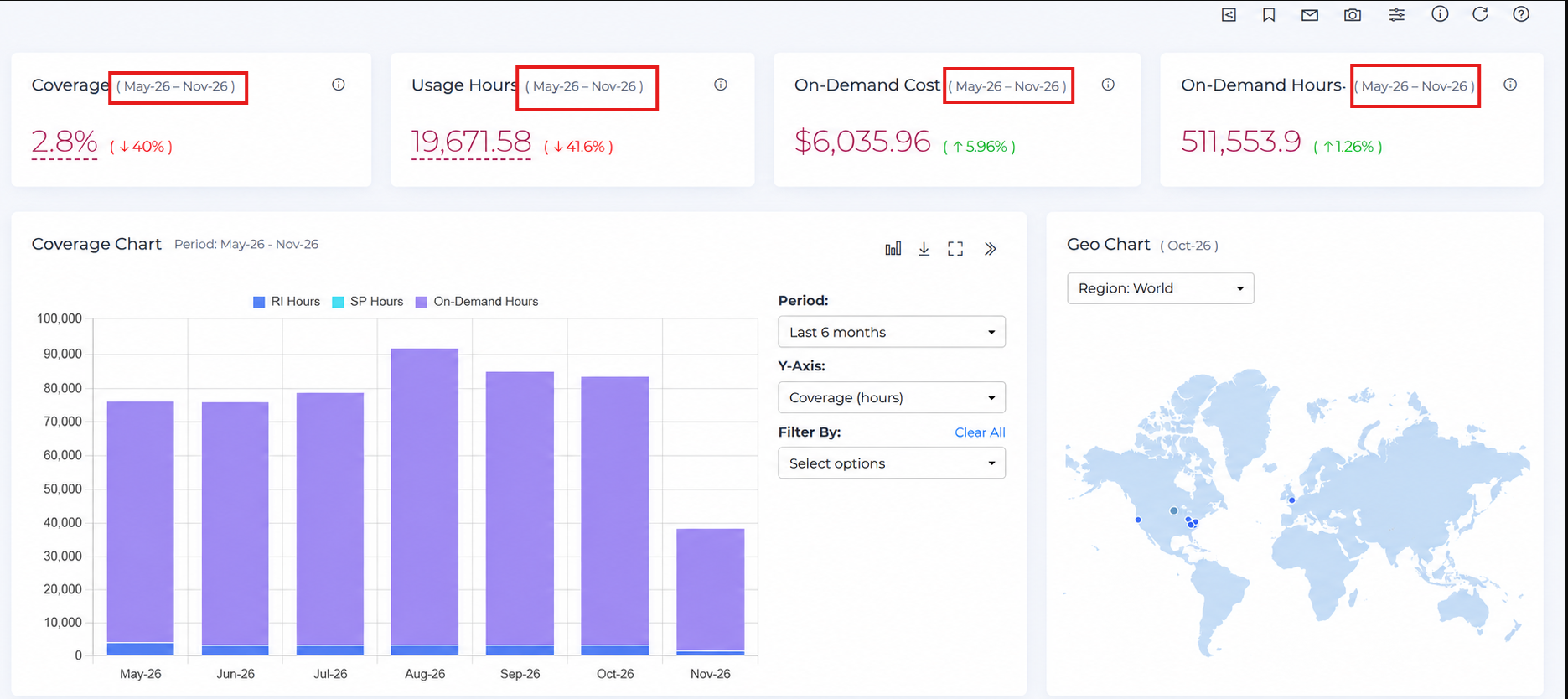
KPI widgets on the Coverage, Reserved Instances, and Savings Plans dashboards under Commitments now show the average across whatever period you select, rather than a single day's values, so the figure reflects the whole period instead of the day you viewed it.
This gives a more representative view of commitment coverage and removes the need to calculate averages manually from daily data.
|
Questions? Reach out to your Mavvrik representative. |