.png)
Price Book" feature helps MSP/Reseller where they can upload a rule book to their partners to customize billing rates across different billing groups. Pricing rules can vary widely, being global, service-specific, billing entity-specific, or location-specific. Users can leverage these rules to apply discounts, markups, hide, or fixed rates within each respective scope. This feature enables customers to adjust pricing accurately according to the specified rules, ensuring optimal cost management.
Why this matters: think of Price Book like a retailer's shelf price versus wholesale cost. What a cloud provider actually charges is the "wholesale" cost, but what a partner's own customer sees on their invoice can (and usually should) be different: marked up for margin, discounted for a negotiated deal, fixed to a flat rate regardless of underlying usage, or in some cases hidden entirely if it's an internal cost that shouldn't appear on a customer-facing bill at all. Price Book is the rule engine that sits between the two and defines that translation, rule by rule, scope by scope.
This shows up differently depending on your role:
-
Partner account managers use Price Book to encode each customer's specific pricing terms (a standing markup on compute, a negotiated discount on storage) without manually adjusting every invoice by hand each cycle.
-
Partner billing and finance ops rely on Price Book to guarantee invoices actually match what was contractually agreed, instead of reconciling differences after the fact.
-
Deal desk and sales use it to turn a negotiated agreement (e.g. "waive the support fee line" or "flat 15% off compute for this account") directly into an enforceable rule, rather than a side note that has to be remembered at billing time.
Before you start: you'll need access to a partner/reseller (MSP) tenant with child tenants already onboarded; Price Book rules are uploaded per child tenant from the partner level.
Steps to Upload Price Book
-
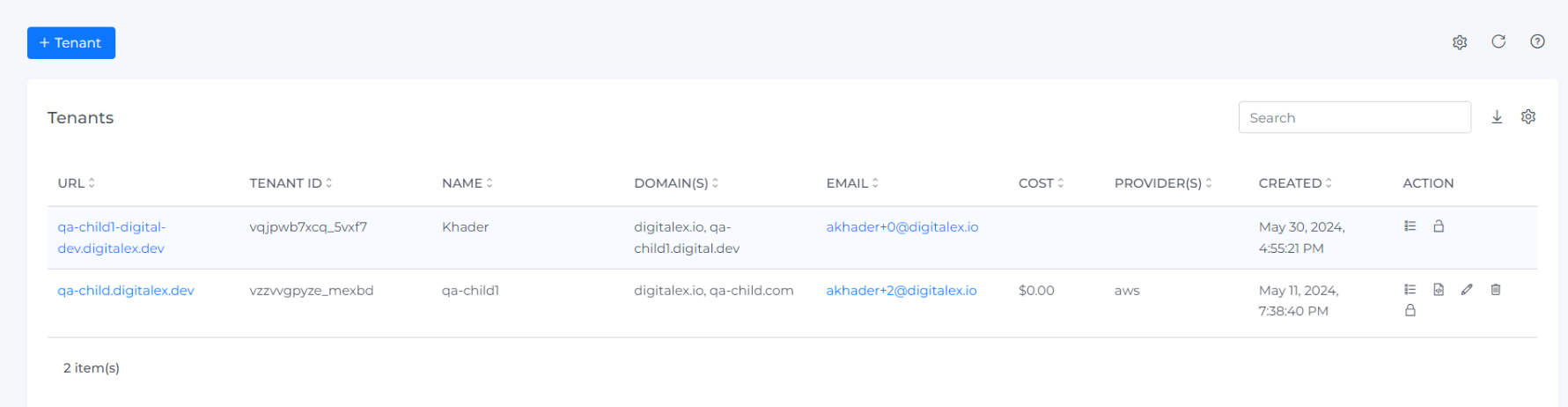
Log in to the partner tenant where all your created child tenants are displayed.
-
Click on the Price Book icon under the Actions column for the tenant where you want to apply the price book.
-
Upload your pricing rule book according to the example below. Ensure you replace the placeholders with your billing account ID, code, and any other required information based on your specific rules.
-
After successfully uploading the price book, wait for the next ingestion to be completed. Ingestions are scheduled every 12 hours.
Below are some of the examples of price rules
---
kind: cloud
book:
  - rule_group_id: awsDiscountForSevice
    provider_code: aws
    billing_account_id: "755387160313"
    start_month: 2024-01
    end_month: 2024-03
    rules:
      - rule_id: awsSelectedServiceDiscount
        line_item:
          product_name:
            - Amazon Elastic Compute Cloud
            - AWS Directory Service
            - Amazon Route 53
        rule_definition:
          adjustment: 10
          rule_type: percent_discount

      - rule_id: awsSelectedServiceMarkup
        line_item:
          product_name:
            - AWS Cost Explorer
            - AWS Directory Service
        rule_definition:
          adjustment: 15
          rule_type: percent_markup
In the above YAML file it contains the kind book and under book, it contains rule group conditions, rule condition, rule comparison and rule types section
kind indicates for which module we are applying the price rule
rule group conditions contain the following conditions as described below
-
provider_code
-
billing_account_id
-
usage_account_id
-
start_month
-
end_month
1] provider_code : is the provider name like AWS, GCP ….
2] billing_account_id : is the account id on which you want to apply
3] usage_account_id : is the account id (subscription/projects/members account id ) I.e. to which Usage account you want to apply
4] start_month : from which month you want to apply the rule
5] end_month : to which month you want to apply the rule
Price rule for supported rule conditions
The YAML file below shows rule conditions that contain the following, as described below
rule conditions,
-
product_name
-
location_id
-
cost_type
-
usage_type
1] product_name : to which service category you want to apply the rule
2] location_id : to which location you want to apply the rule
3] cost_type : to which cost type you want to apply the rule
4] usage_type : to which Usage type you want to apply the rule
YAML ex
---
kind: cloud
book:
  - rule_group_id: awsProductName
    provider_code: aws
    billing_account_id: "755387160313"
    usage_account_id: "755387160313"
    start_month: 2024-01
    end_month: 2024-03
    rules:
      - rule_id: awsS3Discount
        line_item:
          product_name:
            - Amazon Route 53
        rule_definition:
          adjustment: 5
          rule_type: percent_discount

      - rule_id: awsServiceMarkup
        line_item:
          product_name:
            - AWS Cost Explorer
            - AWS Directory Service
            - Amazon Redshift
        rule_definition:
          adjustment: 50
          rule_type: percent_markup

  - rule_group_id: awsLocationDiscount
    provider_code: aws
    start_month: 2024-01
    end_month: 2024-03
    rules:
      - rule_id: awsDiscountusingLocation
        line_item:
          product_name_starts_with: Amazon
          location_id: us-east-1
        rule_definition:
          adjustment: 25
          rule_type: percent_discount

  - rule_group_id: awsForCostType
    provider_code: aws
    start_month: 2024-01
    end_month: 2024-03
    rules:
      - rule_id: awsMarkupasCostType
        line_item:
          product_name_contains: Support
          cost_type: Fee
        rule_definition:
          adjustment: 20
          rule_type: percent_markup

  - rule_group_id: awsForUsageType
    provider_code: aws
    start_month: 2024-01
    end_month: 2024-03
    rules:
      - rule_id: awsForFixedRate
        line_item:
          product_name_contains: AWS
          usage_type: Request
        rule_definition:
          adjustment: 50
          rule_type: fixed_rate
Price rule for Using the Comparison operator
Below are some of the comparison operators that are supported and can be used
rule comparison
-
string
-
eg,
product_name: 'A'
-
-
array
-
eg,
product_name: ['A', 'B']
-
-
_starts_with
-
eg,
product_name: "_starts_with:Amazon"
-
-
_contains
-
eg,
product_name: "_contains:Amazon"
-
YAML ex for rule comparison
---
kind: saas
book:
---
- rule_group_id: awsDiscountForServices
  provider_code: aws
  billing_account_id: "755387160313"
  start_month: 2024-01
  end_month: 2024-03
  rules:
    - rule_id: awsDiscountForServicesRule
      line_item:
        product_name: ['Amazon Elastic Compute Cloud', 'AWS Directory Service','Amazon Route 53']
      rule_definition:
        adjustment: 10
        rule_type: percent_discount
    - rule_id: awsMarkupForServicesRule
      line_item:
        product_name:
          - AWS Cost Explorer
          - AWS Directory Service
      rule_definition:
        adjustment: 15
        rule_type: percent_markup

- rule_group_id: awsDiscountForSupport
  provider_code: aws
  billing_account_id: "755387160313"
  usage_account_id: "755387160313"
  start_month: 2024-01
  end_month: 2024-03
  rules:
    - rule_id: awsDiscountForSupports3
      line_item:
        product_name: 'Amazon Route 53'
      rule_definition:
        adjustment: 5
        rule_type: percent_discount
    - rule_id: awsMarkupForServices
      line_item:
        product_name:
          - AWS Cost Explorer
          - AWS Directory Service
          - Amazon Redshift
      rule_definition:
        adjustment: 50
        rule_type: percent_markup

- rule_group_id: awsDiscountForwildcardSupport
  provider_code: aws
  start_month: 2024-01
  end_month: 2024-03
  rules:
    - rule_id: awsDiscountForServicesRuleWildcard
      line_item:
        product_name: _starts_with:Amazon
        location_id: us-east-1
      rule_definition:
        adjustment: 25
        rule_type: percent_discount

- rule_group_id: awsMarkupForwildcardSupport
  provider_code: aws
  start_month: 2024-01
  end_month: 2024-03
  rules:
    - rule_id: awsMarkupForwildcardSupportRule
      line_item:
        product_name: _contains:Support
        cost_type: Fee
      rule_definition:
        adjustment: 20
        rule_type: percent_markup
Price rule for rule types
Below are the rule types supported
rule types
-
fixed_rate
-
percent_discount
-
percent_markup
-
hide
---
kind: saas
book:
---
- rule_group_id: awsDiscountForServices
  provider_code: aws
  billing_account_id: "755387160313"
  start_month: 2024-01
  end_month: 2024-03
  rules:
    - rule_id: awsDiscountForServicesRule
      line_item:
        product_name: ['Amazon Elastic Compute Cloud', 'AWS Directory Service','Amazon Route 53']
      rule_definition:
        adjustment: 10
        rule_type: percent_discount
    - rule_id: awsMarkupForServicesRule
      line_item:
        product_name:
          - AWS Cost Explorer
          - AWS Directory Service
      rule_definition:
        adjustment: 15
        rule_type: percent_markup

- rule_group_id: awsDiscountForSupport
  provider_code: aws
  billing_account_id: "755387160313"
  usage_account_id: "755387160313"
  start_month: 2024-01
  end_month: 2024-03
  rules:
    - rule_id: awsDiscountForSupports3
      line_item:
        product_name: 'Amazon Route 53'
      rule_definition:
        adjustment: 5
        rule_type: percent_discount
    - rule_id: awsMarkupForServices
      line_item:
        product_name:
          - AWS Cost Explorer
          - AWS Directory Service
          - Amazon Redshift
      rule_definition:
        adjustment: 50
        rule_type: percent_markup

- rule_group_id: awsDiscountForwildcardSupport
  provider_code: aws
  start_month: 2024-01
  end_month: 2024-03
  rules:
    - rule_id: awsDiscountForServicesRuleWildcard
      line_item:
        product_name: _starts_with:Amazon
        location_id: us-east-1
      rule_definition:
        adjustment: 25
        rule_type: percent_discount

- rule_group_id: awsMarkupForwildcardSupport
  provider_code: aws
  start_month: 2024-01
  end_month: 2024-03
  rules:
    - rule_id: awsMarkupForwildcardSupportRule
      line_item:
        product_name: _contains:Support
        cost_type: Fee
      rule_definition:
        adjustment: 20
        rule_type: percent_markup

- rule_group_id: awshideSupport
  provider_code: aws
  start_month: 2024-01
  end_month: 2024-03
  rules:
    - rule_id: awshideSupportRule
      line_item:
        product_name: _contains:Support
        cost_type: Fee
      rule_definition:

        rule_type: hide
Price rules for custom line items
You can add custom line items to customer tenant cost data in Price Book for fees, taxes, credits, and other charges not included in standard cloud billing. This gives partners a more complete and accurate view of customer costs directly within the platform, without needing external workarounds.
Below is an example of it
kind: cloud
book:
  - rule_group_id: discounts
    provider_code: aws
    billing_account_id: "123456789012"
    start_month: "2026-01"
    rules:
      - rule_id: ec2discount
        line_item:
          service_name: "EC2"
        rule_definition:
          rule_type: percent_discount
          adjustment: 10

custom_line_items:
  - rule_group_id: platformfees
    provider_code: aws                       # aws | gcp | azure | oci
    billing_account_id: "123456789012"
    # customer_id: "CUST001"                 # optional customer filter
    # usage_account_id: "111111111111"        # optional usage account filter
    start_month: "2026-01"
    end_month: "2026-12"                     # omit for indefinite/recurring
    rules:
      - rule_id: supportfee
        line_item:
          service_name: "EC2"
          # product_name: "Amazon Elastic Compute Cloud"
          # location_id: "us-east-1"
          # cost_type: "Usage"               # filter on existing row cost_type
          # usage_type: "OnDemand"
          # description: "_contains:instance" # supports _starts_with: and _contains:
        rule_definition:
          adjustment_type: percent           # percent | fixed | tiered_percent | tiered_fixed
          adjustment: 5                      # positive = charge, negative = credit
          output:
            provider_code: "aws"             # required (NOT NULL in cost_daily)
            billing_account_id: "123456789012" # required (NOT NULL in cost_daily)
            provider_currency: "USD"         # required (ISO 4217; needed for rates JOIN)
            # usage_account_id: "custom_line_item" # optional, defaults to "custom_line_item"
            # customer_id: "CUST001"         # optional
            cost_type: "fee"                 # free text, written to cost_daily.cost_type
            product_name: "Platform Support"
            service_name: "Managed Services"
            description: "5% support fee on EC2 usage"
            # usage_type: "Fee"              # optional

      - rule_id: tieredpercentsupport
        line_item: {}                        # empty = match all rows for total cost calculation
        rule_definition:
          adjustment_type: tiered_percent    # tiered bracket lookup (percentage)
          adjustment:                        # tier array for tiered_percent/tiered_fixed
            - from: 0                        # $0 - $100K → 4%
              to: 100000
              value: 4
            - from: 100000                   # $100K - $1M → 3%
              to: 1000000
              value: 3
            - from: 1000000                  # > $1M → 2%
              value: 2                       # no 'to' = unbounded final tier
          output:
            provider_code: "aws"
            billing_account_id: "123456789012"
            provider_currency: "USD"
            cost_type: "fee"
            product_name: "Managed Service Fee"
            service_name: "Support"
            description: "Tiered support fee (percent)"

      - rule_id: tieredfixedsupport
        line_item: {}
        rule_definition:
          adjustment_type: tiered_fixed      # tiered bracket lookup (fixed amount)
          adjustment:
            - from: 0                        # $0 - $100K → $500
              to: 100000
              value: 500
            - from: 100000                   # $100K - $1M → $2000
              to: 1000000
              value: 2000
            - from: 1000000                  # > $1M → $5000
              value: 5000
          output:
            provider_code: "aws"
            billing_account_id: "123456789012"
            provider_currency: "USD"
            cost_type: "fee"
            product_name: "Managed Service Fee"
            service_name: "Support"
            description: "Tiered support fee (fixed)"

      - rule_id: onetimecredit
        line_item: {}
        rule_definition:
          adjustment_type: fixed
          adjustment: -1000                  # negative = credit
          output:
            provider_code: "aws"
            billing_account_id: "123456789012"
            provider_currency: "USD"
            cost_type: "credit"
            product_name: "Promotional Credit"
            service_name: "Credits"
            description: "One-time onboarding credit"
This YAML defines a rule engine for applying discounts, fees, and credits to cloud billing data.
It supports both standard discounts (book) and custom computed charges (custom_line_items).
|
Field |
Type |
Required |
Description |
|---|---|---|---|
|
provider_code |
string |
Yes |
Eg : AWS, GCP |
|
billing_account_id |
string |
Yes |
Eg: 7634568 |
|
provider_currency |
string |
Yes |
ISO 4217 currency code (e.g., |
|
usage_account_id |
string |
No |
Defaults to |
|
cost_type |
string |
No |
Free text; written to |
|
customer_id |
string |
No |
|
|
product_name |
string |
No |
|
|
service_name |
string |
No |
|
|
description |
string |
No |
|
|
usage_type |
string |
No |
|
-
kind: cloud
Indicates that the configuration applies to cloud billing data (e.g., AWS, Azure, GCP).
-
book: Standard Discounts
The book section defines direct modifications to existing cost line items.
Example Rule: EC2 Discount
-
Rule ID:
ec2discount -
Applies to: EC2 service usage
-
Type:
percent_discount -
Adjustment:
10
This applies a 10% discount to all EC2 costs.
Key Fields
-
rule_group_id: Logical grouping of rules -
provider_code: Cloud provider (e.g., aws) -
billing_account_id: Target billing account -
start_month: When the rule becomes active -
line_item: Filters (e.g., service_name) -
rule_definition:-
rule_type: Type of rule (e.g., percent_discount) -
adjustment: Value of discount
-
-
custom_line_items: Additional Charges & Credits
This section creates new cost entries (fees, credits, adjustments) derived from existing usage.
3.1 Percentage-Based Fee
Rule: supportfee
-
Applies 5% fee on EC2 usage
-
Creates a new line item labeled:
-
Service: Managed Services
-
Product: Platform Support
-
Cost Type: fee
-
3.2 Tiered Percentage Fee
Rule: tieredpercentsupport
Applies a progressive percentage fee based on total cost:
|
Cost Range |
Fee % |
|---|---|
|
$0 – $100,000 |
4% |
|
$100,000 – $1M |
3% |
|
> $1M |
2% |
Behavior:
-
Cost is split into tiers.
-
Each tier is charged at its respective percentage.
3.3 Tiered Fixed Fee
Rule: tieredfixedsupport
Applies fixed charges based on cost brackets:
|
Cost Range |
Fee |
|---|---|
|
$0 – $100,000 |
$500 |
|
$100,000 – $1M |
$2000 |
|
> $1M |
$5000 |
Behavior:
-
Only one tier applies based on total cost.
3.4 One-Time Credit
Rule: onetimecredit
-
Applies a fixed credit of -$1000
-
Marked as:
-
Cost Type: credit
-
Service: Credits
-
-
Rule Matching (
line_item)
Defines which cost rows a rule applies to.
Examples
-
service_name: "EC2"→ Only EC2 usage -
{}→ Applies to all cost rows -
Supports advanced filters:
-
_contains: -
_starts_with:
-
-
Adjustment Types
|
Type |
Description |
|---|---|
|
|
% of matched cost |
|
|
Flat amount |
|
|
Progressive % across cost tiers |
|
|
Fixed fee based on cost bracket |
-
Output Configuration
Each custom rule generates a new cost line item with:
-
provider_code(required) -
billing_account_id(required) -
provider_currency(required, ISO format) -
cost_type(e.g., fee, credit) -
product_name -
service_name -
description
These values populate the cost reporting table (cost_daily).
Price rules for SaaS
Below is the YAML Example to apply the price rule for SaaS cost and the rule type supported are rule types
-
percent_discount
-
percent_markup
-
hide
Below is the YAML Example for percent_discount
---
kind: saas
book:
  - rule_group_id: Apply20PercentVAT
    provider_code: databricks
    rules:
      - rule_id: Add5PercentVAT
        line_item: {}
        rule_definition:
          rule_type: percent_markup
          adjustment: 20
This YAML defines a markup rule for SaaS billing data.
It applies a Value Added Tax (VAT) on top of existing costs.
-
kind: saas
Specifies that this configuration applies to SaaS provider billing data
(e.g., Databricks, MongoDB, Snowflake).
-
book: Cost Adjustment Rules
The book section is used to modify existing cost line items directly.
Rule Group: Apply20PercentVAT
-
Provider: Databricks
-
Purpose: Apply VAT to all usage costs
Rule: Add5PercentVAT
Note: The rule name suggests 5%, but the actual configuration applies 20%.
Behavior
-
Applies a 20% markup to all cost line items.
-
No filters are defined (
line_item: {}), so:-
Applies to all services
-
Applies to all usage types
-
-
Rule Definition
-
Type:
percent_markup -
Adjustment:
20
-
This increases the original cost by 20%.
Example
|
Base Cost |
VAT (20%) |
Final Cost |
|---|---|---|
|
$100 |
$20 |
$120 |
|
$500 |
$100 |
$600 |
Below is the Example for percent_discount
---
kind: saas
book:
  - rule_group_id: Apply5PercentVAT
    provider_code: snowflake
    rules:
      - rule_id: Add5PercentDiscount
        line_item: {}
        rule_definition:
          rule_type: percent_discount
          adjustment: 5
It reduces the overall cost by a fixed percentage.
-
kind: saas
Indicates that the rule applies to SaaS provider billing data, such as Snowflake.
-
book: Cost Adjustment Rules
The book section is used to directly modify existing billing line items.
Rule Group: Apply5PercentVAT
-
Provider: Snowflake
-
Purpose: Apply a percentage-based adjustment to all costs
Note: The group name suggests VAT, but the rule actually applies a discount, not a tax.
Rule: Add5PercentDiscount
Behavior
-
Applies a 5% discount to all billing line items.
-
Since
line_itemis empty ({}):-
Applies to all Snowflake services
-
Applies to all usage types
-
-
Rule Definition
-
Type:
percent_discount -
Adjustment:
5
-
This reduces the original cost by 5%.
Example
|
Original Cost |
Discount (5%) |
Final Cost |
|---|---|---|
|
$100 |
-$5 |
$95 |
|
$1000 |
-$50 |
$950 |
Below is the Example for hide
---
kind: saas
book:
  - rule_group_id: Apply5PercentVAT
    provider_code: mongodb
    rules:
      - rule_id: hide
        line_item:
          cost_type:
          - Credit
        rule_definition:
          rule_type: hide
kind: saas
Indicates that this configuration applies to SaaS billing data.
-
book: Cost Adjustment Rules
The book section is used to modify or control visibility of existing billing line items.
Rule Group: Apply5PercentVAT
-
Provider: MongoDB
-
Purpose: Control visibility of certain cost types
Note: The group name suggests VAT, but this rule is unrelated to tax. It handles data filtering (hiding).
Rule: hide
Behavior
-
Hides all line items where:
-
cost_type = Credit
-
This means:
-
Credits will not appear in final cost reports.
-
Only chargeable costs remain visible.
-
Line Item Filter
line_item:
  cost_type:
    - Credit
-
Matches all billing records categorized as Credit.
-
Can include:
-
Promotional credits
-
Refunds
-
Adjustments
-
-
Rule Definition
-
Type:
hide
-
This does not modify cost values.
Instead, it removes matching rows from output datasets.
Troubleshooting
An uploaded price rule is not affecting the intended costs
-
Confirm that you uploaded the price book to the intended child tenant from the partner tenant.
-
Check the configuration's kind, provider_code, billing_account_id, and any usage_account_id against the costs you want to adjust. Replace example identifiers with your own values.
-
Check that start_month and end_month cover the month being reviewed, and that the line_item conditions match the relevant cost records.
-
Verify the rule_type and adjustment, then confirm that an ingestion has completed after the upload before comparing the resulting costs.
A custom fee or credit is missing
-
Check that the rule is defined under custom_line_items rather than only under book, which modifies existing cost rows.
-
Verify the rule's account scope, active months, and line_item conditions.
-
Check that output includes the documented required fields: provider_code, billing_account_id, and provider_currency.
-
Confirm that adjustment_type and adjustment describe the intended charge or credit, and that an ingestion has completed since the updated configuration was uploaded.