.png)
|
🚀 Release Highlights |
Our September 2026 release introduces Mavvrik Agent for conversational cost analysis, expands Microsoft Copilot and agent cost visibility, and adds support for actual GenAI pricing and EVE agents. Platform improvements include additional Custom Reports fields, historical Savings views, Reservation and Savings Plan filters, and expanded AI Assist dimensions.
For more details, please reach out to your Mavvrik representative or check our updated documentation Help Center
|
Release Version |
Features |
|---|---|
|
Release-2026.09.10 |
🤖 AI for FinOps
🧾 FinOps for AI
⚙️ Platform Improvements
|
🤖 AI for FinOps
|
Bring AI into your everyday FinOps work. |
Mavvrik Agent PRIVATE ALPHA, INVITE ONLY
Ask questions about your costs in plain English, right from the product.
The Mavvrik Agent gives you a conversational way to explore your Mavvrik data. You write no queries. You move between no dashboards. You can ask about cloud cost, Kubernetes spend, SaaS cost, GenAI usage, savings, cost allocation, tag coverage, Agentic data, and datacenter cost.
The Agent answers with tables and charts when they help. It keeps the context of your conversation, so a follow-up question needs no repetition of the first one.
You can also extend the Agent to fit your team. Upload a Skill , a document describing your conventions, chargeback rules, or reporting format, and the Agent follows it every time that topic comes up. Or add a Connector for Jira, GitHub, Sentry, or any other MCP-compatible tool, so the Agent can look up a ticket, check a pull request, or correlate an error spike with a cost spike. You never leave the conversation.
This feature is currently in Private Alpha and is available by invitation only. Contact your Customer Success Manager if you are interested in early access.
🧾 FinOps for AI
|
Govern AI assistant and agent spend like any other cost. |
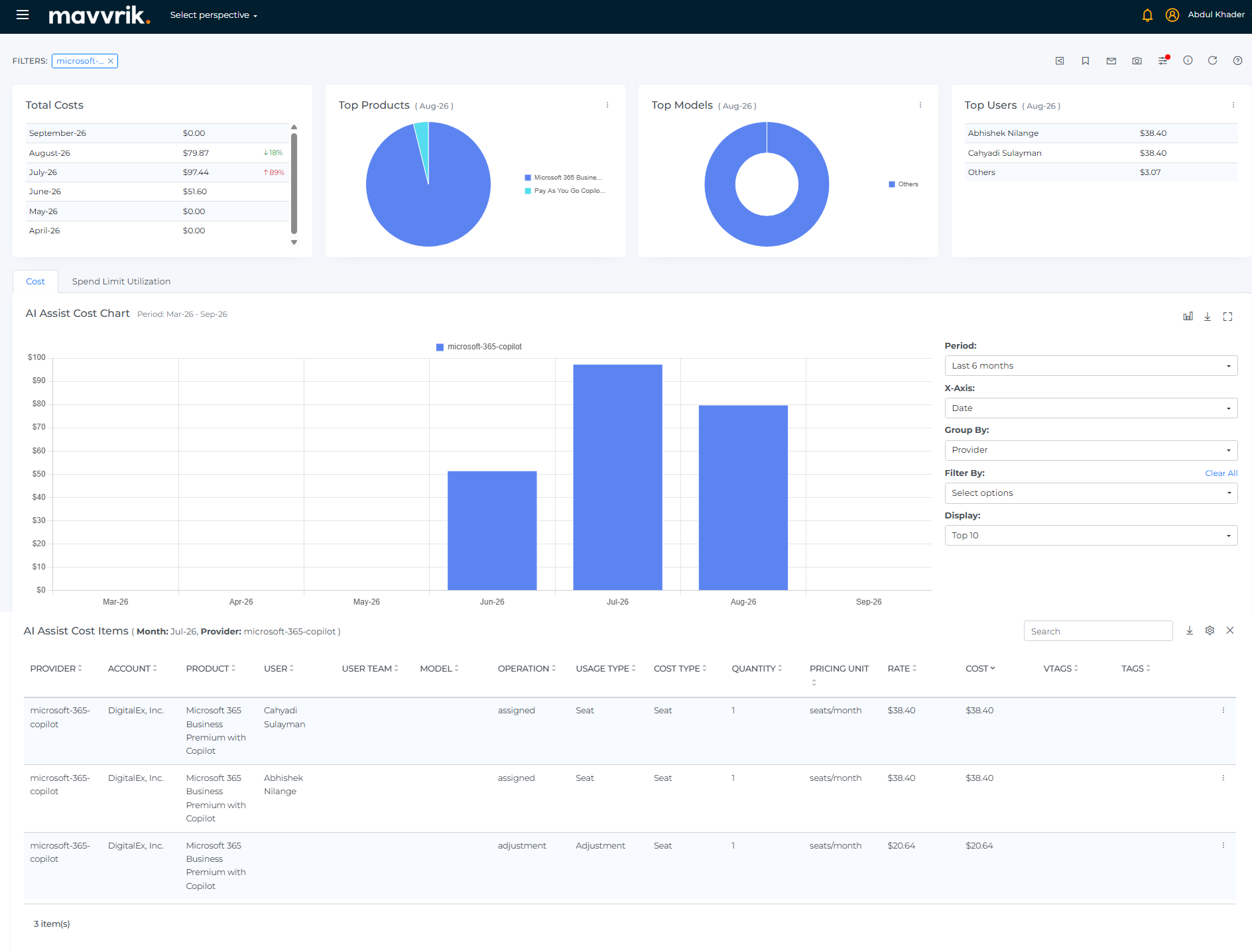
Microsoft 365 Copilot Cost Insights BETA
See the fixed license cost of Microsoft 365 Copilot, and the total on-demand spend.
Microsoft 365 Copilot cost insights show the fixed license cost for your users. Where the Microsoft Copilot API integration supports it, you also see the total on-demand spend.
Cost Type separates the two. Seat is the fixed cost for each user. Usage, Included Usage, and Included Usage Credit cover on-demand consumption.
You can filter these costs by Provider, Account, Model, User, and Department. These are the same dimensions as the AI Assist Cost page.
This feature is in Beta. Contact your Customer Success Manager to request access.
Actual GenAI Pricing for Agent Cost Attribution
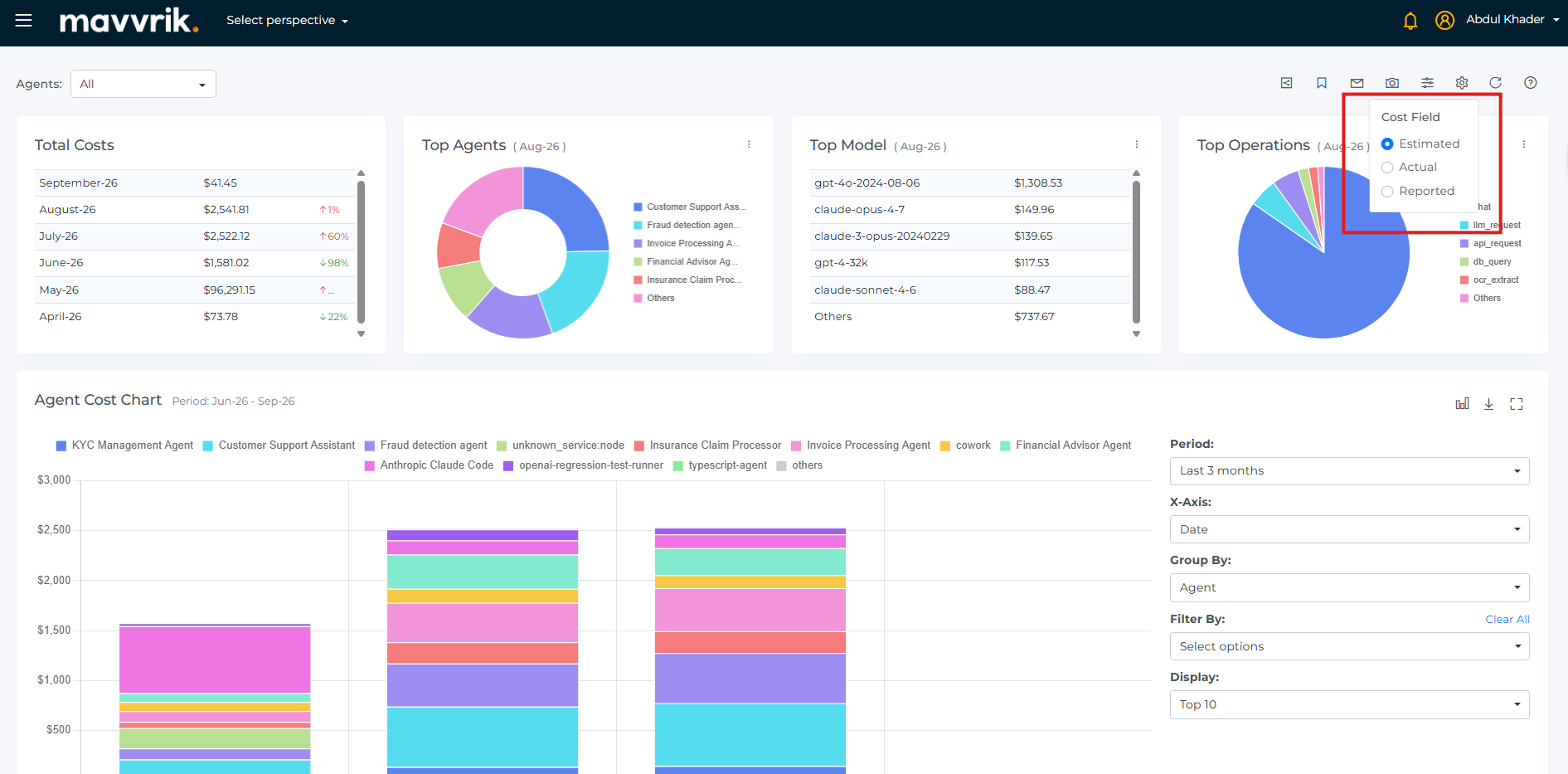
Use your negotiated GenAI rates for agent cost, not public list price.
Agent cost attribution now has an Actual view next to the Estimated view. The Estimated view uses list price.
When you select Actual, Mavvrik calculates agent cost from your negotiated rates. It takes these rates from the GenAI charges on your connected cloud billing account. You then see real spend by agent, by model, and by operation.
If a model or a provider has no negotiated rate, Mavvrik uses list price instead. Your agent cost stays complete for every model and every provider.
EVE Agent Support via OpenTelemetry
EVE agents can now be connected to Mavvrik without adding the Mavvrik SDK to the application.
Register an EVE agent on the Connect tab. Mavvrik makes the agent identity and an instrumentation file for you. Add that one file to your EVE project.
Mavvrik then shows EVE agent activity for each session: LLM calls, tool calls, token usage, and cost. The Agent Cost Items breakdown by model and by usage type works the same as your other agent sources.
You can also attach your own user identity and custom tags to each run through the EVE instrumentation hooks. Your EVE spend then reports on the same organizational and product dimensions as the rest of Mavvrik.
⚙️ Platform Improvements
|
Platform refinements across Custom Reports, Savings, Resources, and AI Assist. |
Custom Reports Enhancements
Report on new Kubernetes namespaces and on resource group lifecycle.
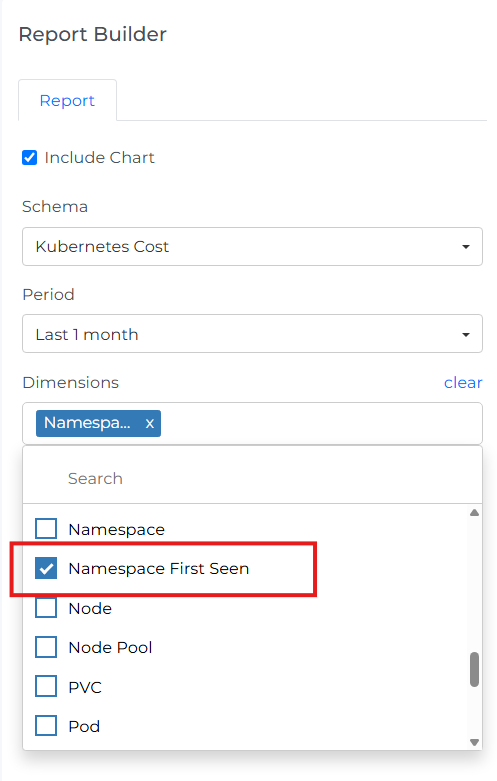
The Kubernetes Cost schema now has a Namespace First Seen field. Use it to find the Kubernetes namespaces that Mavvrik detected recently.
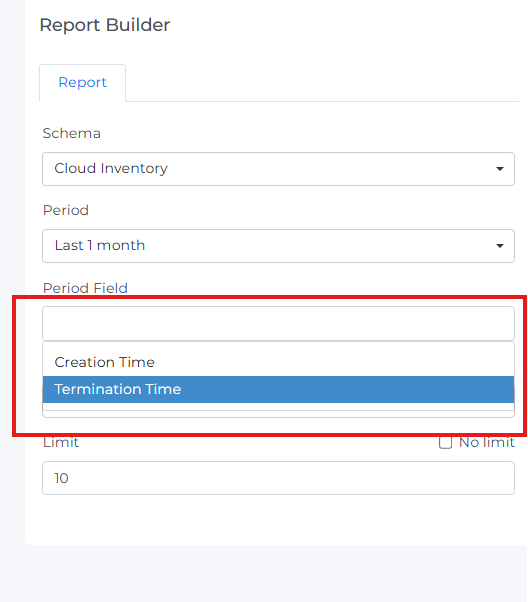
The Cloud Inventory schema now has Creation Time and Termination Time as period fields. Use them to report on when a resource group started and when it ended.
Savings dashboard Enhancements
Review savings history BETA and policy details more easily
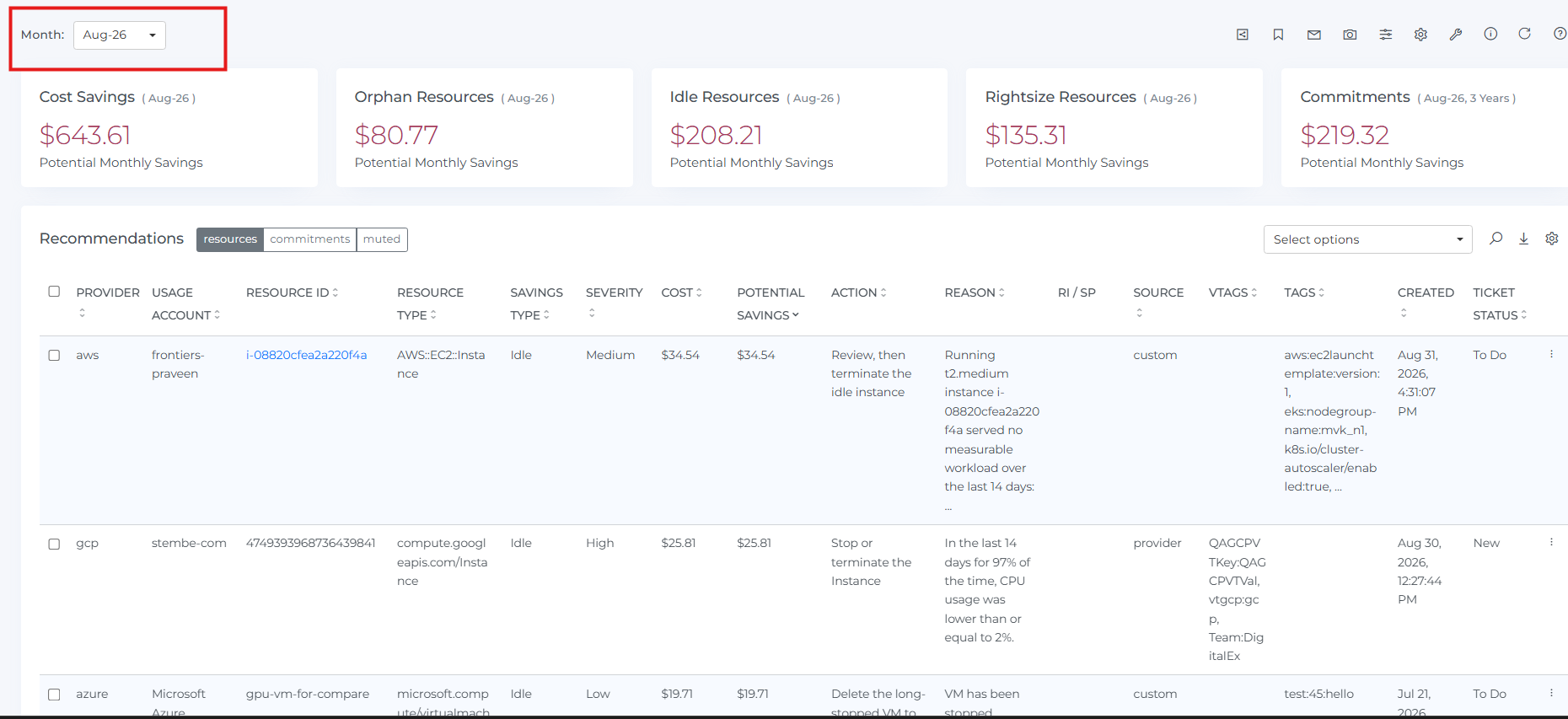
You can now select a specific month from the Month dropdown on the Savings page. Select a month to view historic savings for that period. You can then compare past savings against the latest view.
This feature is in Beta. Contact your Customer Success Manager to request access
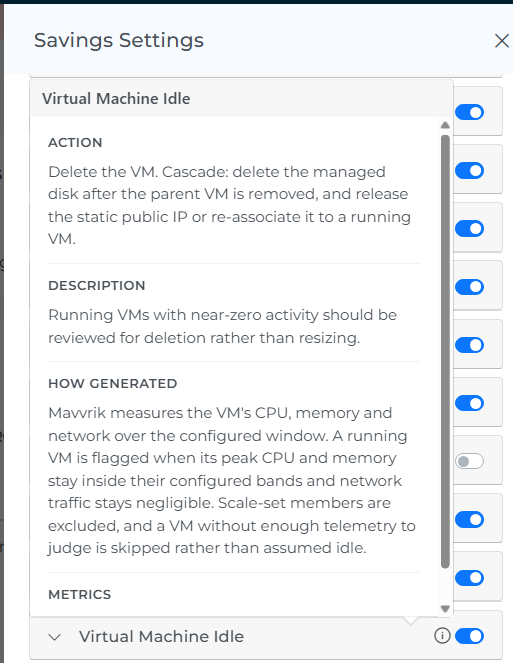
You can now see policy information through info icons on the Savings page. This helps you understand custom recommendation policy details without leaving your workflow
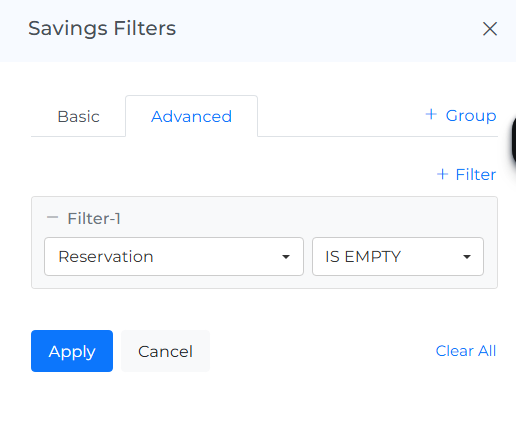
Reservation and Savings Plan Filtering
Find the resources that a Reservation or a Savings Plan does not cover.
Resources, Savings have two new advanced filter fields: Reservation and Savings Plan. Use them to isolate the resources without coverage. Use them also to make sure that a resource has coverage.
AI Assist Enhancements
Analyze, allocate, and reuse your AI Assist cost and utilization data.
The AI Assist Cost page now has a Team column. Team is also a filter field and a grouping dimension.
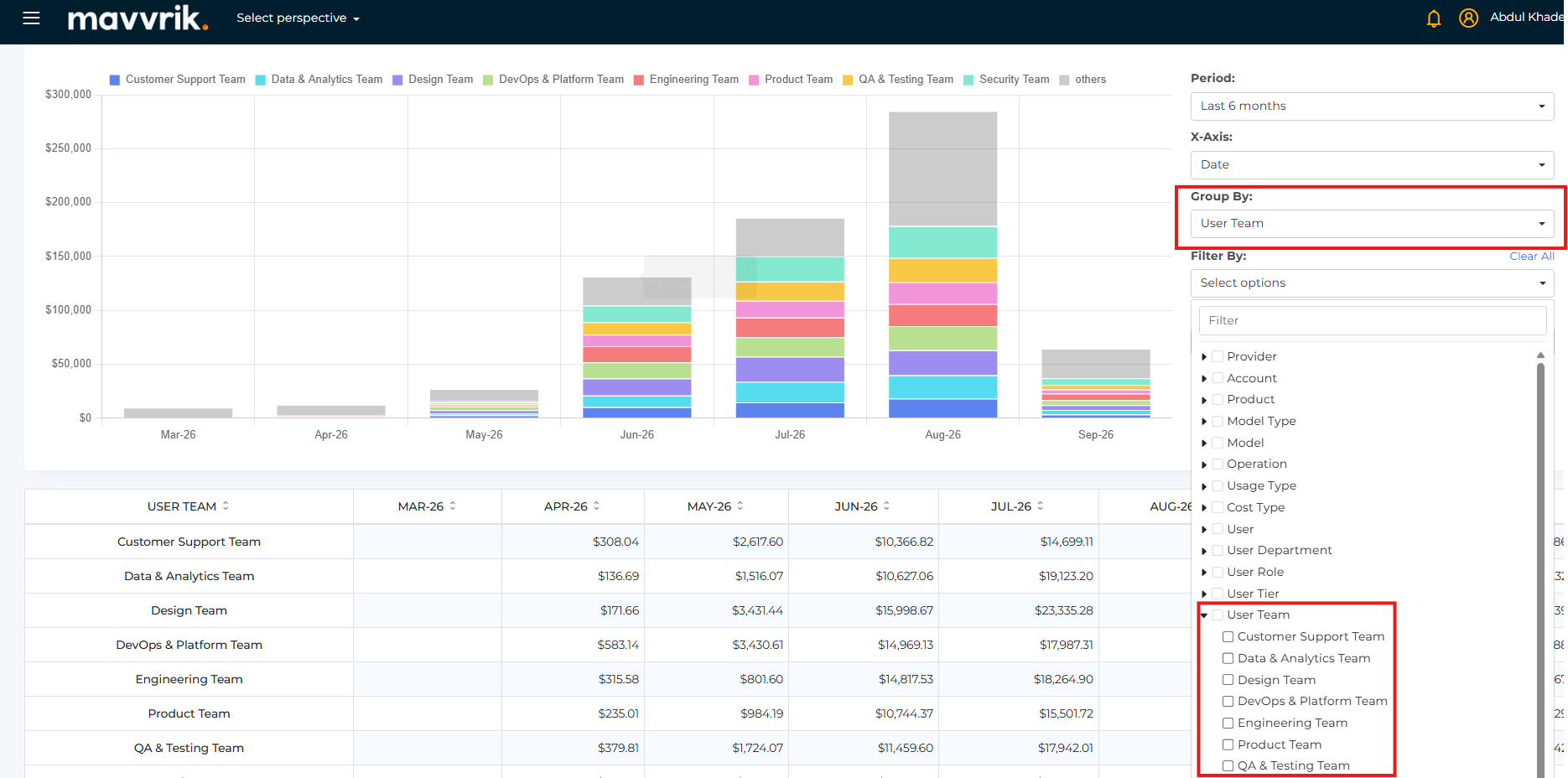
Cost Allocation auto-discover now supports these AI Assist fields: User, User Department, User Role, User Team, Product, and Model. Use them to allocate AI Assist spend by organization and by product.
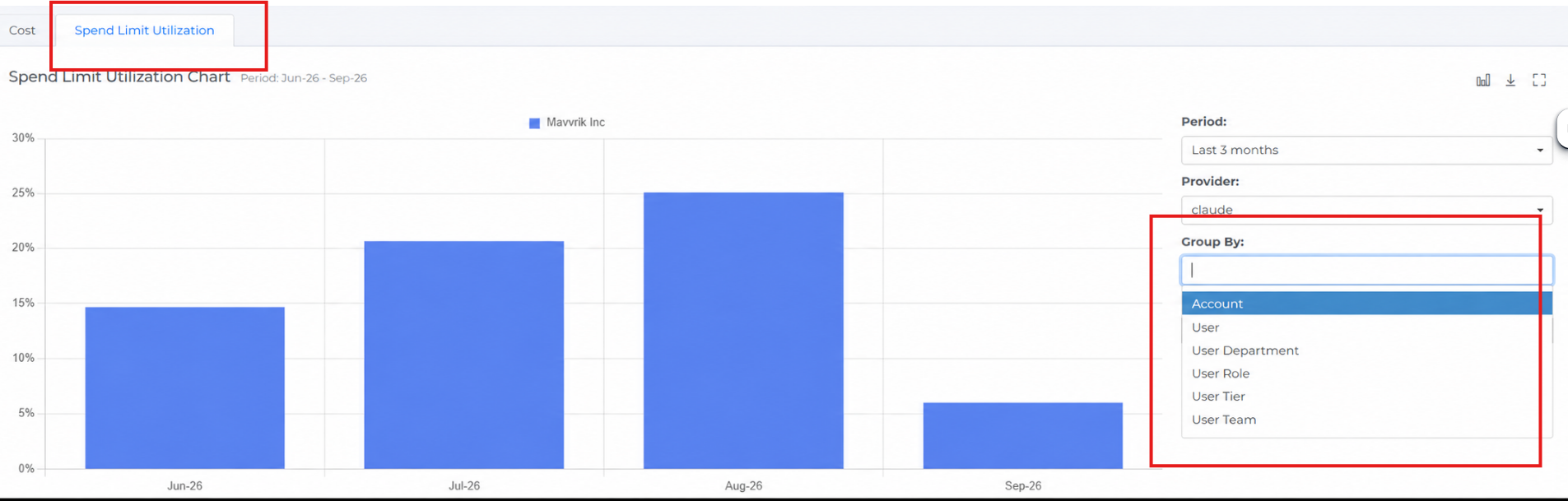
Seat Utilization is now Spend Limit Utilization. The page now has a new Group By field, and you can customize the top widgets by User, Department, Role, Tier, Team.
|
Questions? Reach out to your Mavvrik representative. |