.png)
-
Go to Menu
-
Click on Public Clouds under Admin
-
Click on the **Member Accounts** dropdown (top right) and select **Redeploy**

-
In the Redeploy Member Accounts panel, under the CloudShell tab, click **Log In** to the AWS Management Account shown (AWS CloudShell will open)
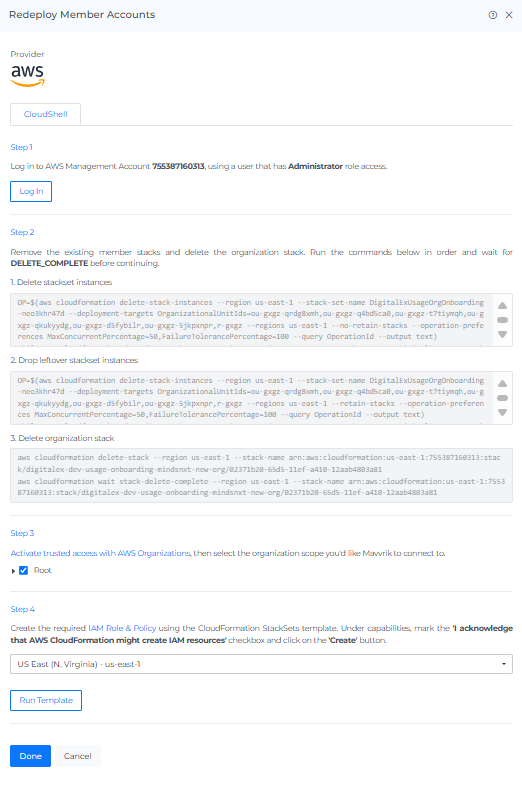
Note: Make sure you are logged in with a user that has Administrator role access.
-
Copy the delete-stack command and paste it into AWS CloudShell & click Enter
Note: Wait for the stack to reach `DELETE_COMPLETE` before continuing — this is required, or the next steps will fail.
-
Activate trusted access with AWS Organizations, then select the organization scope (e.g. Root) you want Mavvrik to connect to
-
Select your region, check "I acknowledge that AWS CloudFormation might create IAM resources," and click **Run Template**
-
Come back to Mavvrik & click on Done
-
AWS Member account will show as Processing, then update to Connected once the redeploy completes.