.png)
Why this matters: the default install passes the Mavvrik API key as a plain value in values.yaml (fine for a quick test, but not something most security-conscious teams want checked into version control alongside their Helm values). Using a Kubernetes Secret and referencing it via apiKeySecretRef keeps the actual key out of your config files entirely.
If you want to save the Mavvrik Kubernetes API key as a secret and use it as a SecretRef, please follow the steps below:
-
Pull the helm charts on your local and untar it
helm pull oci://us-central1-docker.pkg.dev/cloudwiz-io/public-charts/dx-k8s-appliance --untar
-
Edit the values.yaml from the values from
-
Go to Mavvrik Kubernetes Onboarding Landing Page
-
Mavvrik Console > Admin Tab > Accounts > Kubernetes
-
If it's a new cluster click +Cluster Icon on left top
-
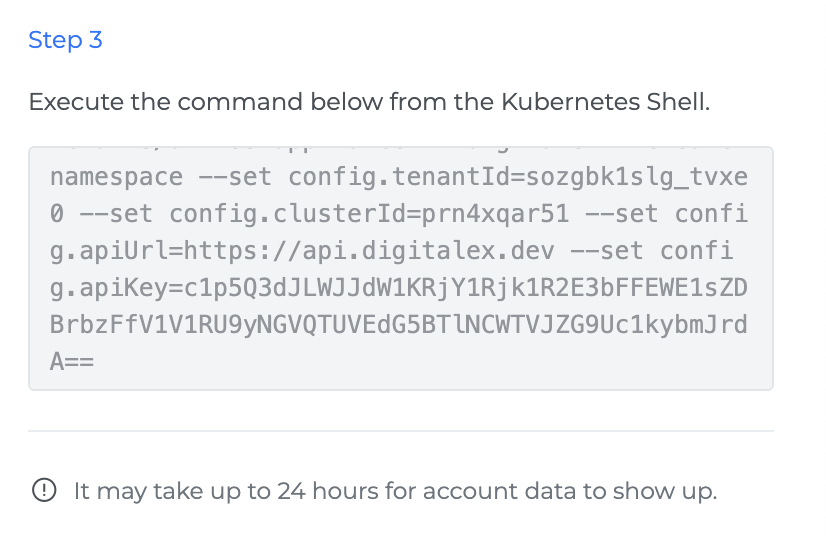
Then from step 3 from the side panel copy the values.
-
-
The API key is a base64-encoded string; you'll need to convert it to get the original value first using https://www.base64decode.org/ or any other utility
-
Create your k8s secret and pass the ref in apiKeySecretRef
-
Eg:
kubectl create secret generic my-super-secret \
  --from-literal=my-super-secret='<YOUR_DECODED_API_KEY>' \
  -n mavvrik
The API key is specific to each cluster. If you onboard more than one cluster, create a separate Secret for each cluster using that cluster's own Mavvrik API key.
-
-
Similarly, fill in the required values in values.yaml
config: tenantId: "<TENANT_ID>" apiUrl: "https://api.mavvrik.io" apiKeySecretRef: name: "my-super-secret" key: "my-super-secret" apiKey: "" clusterId: "<CLUSTER_ID>" prometheusEndpoint: "" Enter your Prometheus URL provider: "k8s" development: false -
Install Mavvrik Kubernetes appliance using if you are inside
helm upgrade --install dx-k8s-appliance dx-k8s-appliance/ -f dx-k8s-appliance/values.yaml -n mavvrik
Troubleshooting
-
If the API key doesn't work in your secret, confirm you actually decoded it first: the value copied from Mavvrik's UI is base64-encoded, not the literal key.
-
If authentication seems inconsistent, confirm
apiKeyis left as an empty string invalues.yamlwhen usingapiKeySecretRef: the secret reference is what supplies the key.
FAQs
Why do I need to base64-decode the API key first?
Mavvrik's UI provides the key in base64-encoded form. The Kubernetes secret needs the actual decoded value, not the encoded string, so it has to be decoded before creating the secret.
Do I still need to fill in the apiKey field if I'm using apiKeySecretRef?
No, leave apiKey as an empty string when using apiKeySecretRef. The secret reference is what actually supplies the key at runtime.