.png)
Why this matters: the default install passes the Mavvrik API key as a plain value in values.yaml — fine for a quick test, but not something most security-conscious teams want checked into version control alongside their Helm values. Using a Kubernetes Secret and referencing it via apiKeySecretRef keeps the actual key out of your config files entirely.
If you want to save the Mavvrik K8s API key as a secret and use it as a SecretRef, please follow the steps below:
-
Pull the helm charts on your local and untar it
helm pull oci://us-central1-docker.pkg.dev/cloudwiz-io/public-charts/dx-k8s-appliance --untar
-
Edit the values.yaml from the values from
-
Go to Mavvrik k8s Onboarding Landing Page
-
Mavvrik Console > Admin Tab > Accounts > Kubernetes
-
If it's a new cluster click +Cluster Icon on left top
-
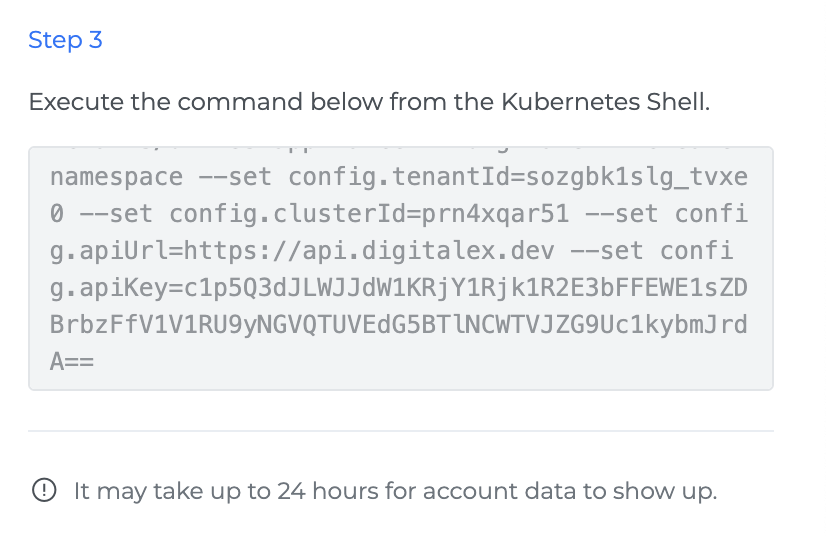
Then from step 3 from the side panel copy the values.
-
-
The API key is a base64-encoded string; you'll need to convert it to get the original value first using https://www.base64decode.org/ or any other utility
-
Create your k8s secret and pass the ref in apiKeySecretRef
-
Eg:
kubectl create secret generic my-super-secret \
  --from-literal=my-super-secret='mJJ6VBYvU8zHfreiHlKEkerGVRwrNCE0-9_oIfHXzUav-C27Y2MAIJH67yoCrTtw' \
  -n mavvrik
-
-
Similarly, fill in the required values in values.yaml
config: tenantId: "sozgbk1slg_tvxe0" apiUrl: "https://api.mavvrik.io" apiKeySecretRef: name: "my-super-secret" key: "my-super-secret" apiKey: "" clusterId: "prn4xqar51" prometheusEndpoint: "" Enter your Prometheus URL provider: "k8s" development: false -
Install mavrrick k8s appliance using if you are inside
helm upgrade --install dx-k8s-appliance dx-k8s-appliance/ -f dx-k8s-appliance/values.yaml -n mavvrik
Troubleshooting
-
If the API key doesn't work in your secret, confirm you actually decoded it first — the value copied from Mavvrik's UI is base64-encoded, not the literal key.
-
If authentication seems inconsistent, confirm
apiKeyis left as an empty string invalues.yamlwhen usingapiKeySecretRef— the secret reference is what supplies the key.
FAQs
Why do I need to base64-decode the API key first?
Mavvrik's UI provides the key in base64-encoded form. The Kubernetes secret needs the actual decoded value, not the encoded string, so it has to be decoded before creating the secret.
Do I still need to fill in the apiKey field if I'm using apiKeySecretRef?
No — leave apiKey as an empty string when using apiKeySecretRef. The secret reference is what actually supplies the key at runtime.