.png)
Retrieve the Tenant Id from Setup Page
Why this matters: the Tenant ID is what identifies your specific Mavvrik environment when setting up API access or third-party integrations — you'll need it any time you're connecting an external tool that talks to Mavvrik directly rather than through the UI.
-
Login to Mavvrik
-
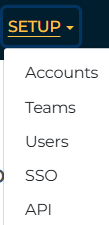
Click on Setup from Header
-
Click on API
-
Capture the Tenant id

Retrieve the Tenant Id from Menu
-
Login to Mavvrik
-
Click on Menu
-
Click on API under the Admin
-
Capture the Tenant id