.png)
Introduction
When you build AI agents, the model call is only part of the story. A real workflow usually includes tool calls, external APIs, data lookups, and multiple LLM invocations - each contributing to what the workflow actually costs. To understand that cost properly, you need visibility across the whole flow, not just what the provider bills you.
That is what Mavvrik gives you. Once your agent is connected, the SDK automatically captures supported LLM activity - token counts, model usage, latency, and cost. Add business context like user, session, and customer, and the data becomes meaningful: you can navigate by workflow, group by customer, and trace exactly what happened in a given run.
This guide is designed to get you from zero to first visible data in the Mavvrik dashboard without overcomplicating the setup. You will register an agent, install the SDK, initialize instrumentation, add context around a real workflow, and verify the data shows up. After that, you will see how to track non-LLM steps using cost signals and metered usage.
Once integrated, you will mainly use three places in the dashboard: Cost for spend over time, Sessions for end-to-end workflow inspection, and Anomalies for unusual cost or usage patterns.
Step 1: Register your agent in the Mavvrik dashboard
Go to Admin → Accounts → Agents and click + Agent.
A right-side drawer opens with two tabs: Setup and Connect.
In the Setup tab, Mavvrik generates an Agent ID (UUID) automatically. You can keep it or edit it during registration - it cannot be changed after. Enter an Agent Name and an optional Description.
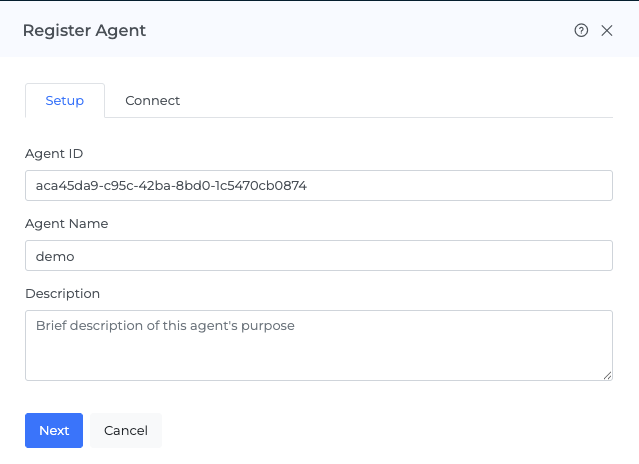
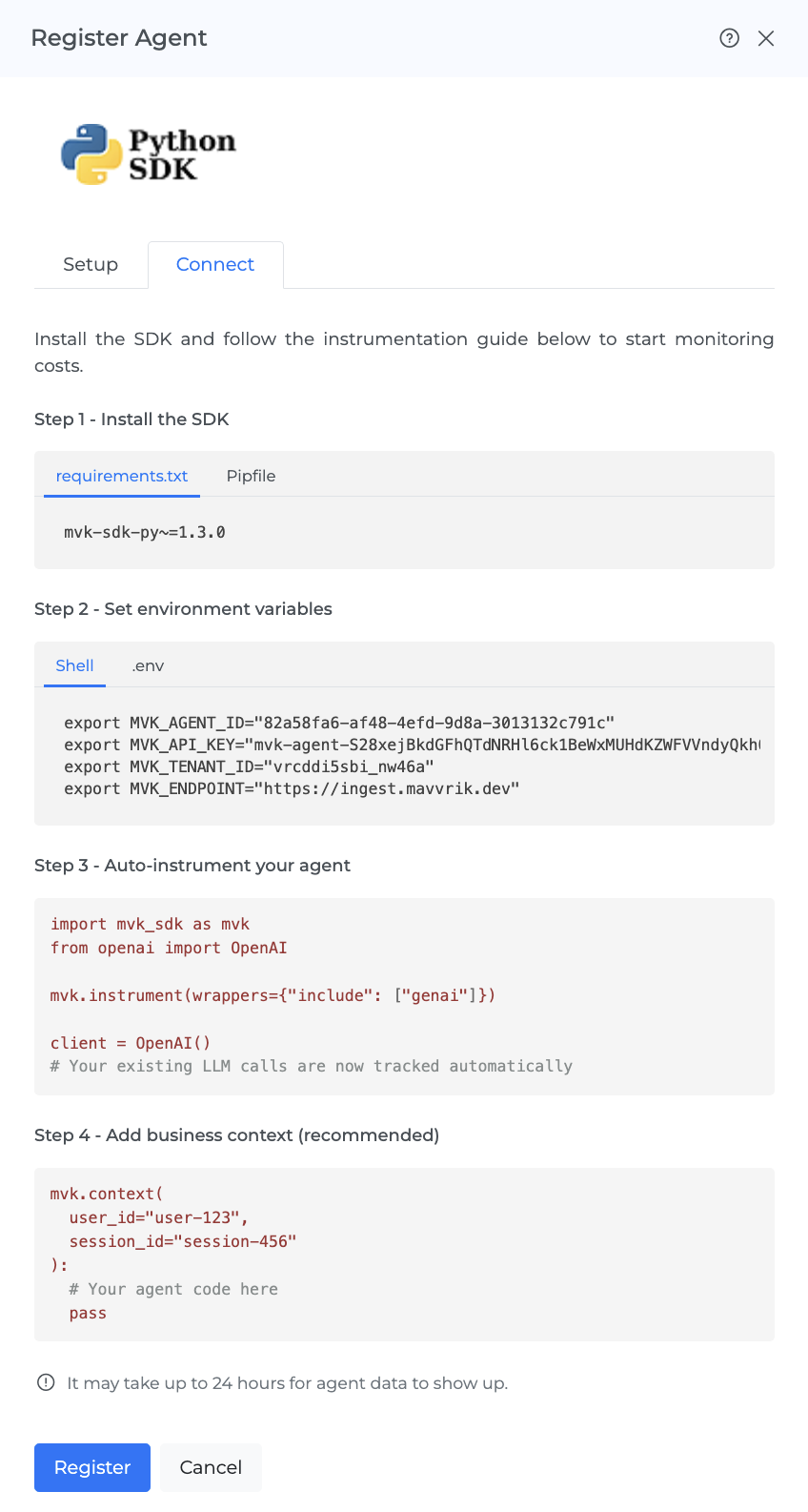
Click Next and move to the Connect tab. Click Download SDK to download the package, copy the environment variables, and then click Register to finish.
Step 2: Install the SDK
Install the Mavvrik SDK using whichever dependency manager your project uses.
Option A: Pipfile (pipenv)
Add the SDK to the [packages] section of your Pipfile:
[packages]
mvk-sdk-py = "~=1.3.0"
Then install it alongside your existing dependencies:
pipenv install
Option B: requirements.txt (pip)
Add the SDK to your requirements.txt:
mvk-sdk-py~=1.3.0
Then install it alongside your existing dependencies:
pip install -r requirements.txt
Note: The ~=1.3.0 version specifier pins the SDK to the 1.3.x series, so you automatically receive patch updates without breaking changes.
Once installed, mvk_sdk is available in your Python application.
The one rule that matters most
Initialize the SDK before importing your LLM provider or framework libraries.
The SDK instruments supported libraries at import time. If the provider library is already imported, the SDK will miss those calls.
Always follow this order:
import mvk_sdk as mvk

mvk.instrument(wrappers={"include": ["genai"]})

from openai import OpenAI
Core concepts
Session - One complete user interaction or workflow. A session_id ties all related steps together so you can see the full end-to-end cost in one place.
Trace - The execution path of one request inside a session. Shows what happened, in order, from start to finish.
Span - One individual step inside the trace. Each LLM call, tool execution, API request, or database query is its own span.
Auto-instrumentation - Once the SDK is initialized correctly, supported LLM calls are tracked automatically - token usage, model name, latency, and cost.
Business context - Adds meaning to raw telemetry. Without it, you know a model call happened. With it, you know which user triggered it, which session it belonged to, and which customer it served. Set using mvk.context().
Cost signals - Track non-LLM steps. Use mvk.create_signal() to mark a specific step, or @mvk.signal() to set a boundary around a whole function.
Level 1: Automatically track supported LLM calls
The fastest way to get started is to initialize the SDK once at application startup. After that, supported LLM calls are tracked automatically - no changes needed to your existing provider calls.
import mvk_sdk as mvk

mvk.instrument(wrappers={"include": ["genai"]})

from openai import OpenAI

client = OpenAI()

def answer_customer_question(message: str) -> str:
    response = client.chat.completions.create(
        model="gpt-4o-mini",
        messages=[{"role": "user", "content": message}]
    )
    return response.choices[0].message.content
This captures the model call, token usage, latency, and cost - but not which user or workflow it belonged to. Add business context to make the data more usable.
Level 2: Add business context
Auto-instrumentation gives you technical telemetry. Business context is what makes it understandable.
Suppose a customer is chatting with your support agent. You want to know how much that conversation cost, which user triggered it, and how to find that workflow later in the Sessions view if someone reports a problem. That is where mvk.context() comes in - you set the context once for the workflow, and every operation inside it inherits that information automatically.
import mvk_sdk as mvk

mvk.instrument(wrappers={"include": ["genai"]})

from openai import OpenAI

client = OpenAI()

def handle_support_chat(message: str, user_id: str, session_id: str, customer_id: str) -> str:
    with mvk.context(
        user_id=user_id,
        session_id=session_id,
        customer_id=customer_id
        tags={
            "key": value,
            "key": value
        }
    ):
        response = client.chat.completions.create(
            model="gpt-4o-mini",
            messages=[{"role": "user", "content": message}]
        )
        return response.choices[0].message.content
With context set, you can search by session_id in the Sessions view, understand the cost of a complete conversation, and group activity by customer.
Not every agent is a chatbot - many work on files and documents. For example, a user uploads a contract, the system extracts the text, and the model summarizes it. The pattern is the same:
def summarize_document(document_text: str, user_id: str, session_id: str, customer_id: str) -> str:
    with mvk.context(
        user_id=user_id,
        session_id=session_id,
        customer_id=customer_id
    ):
        response = client.chat.completions.create(
            model="gpt-4o-mini",
            messages=[
                {"role": "system", "content": "Summarize the document clearly."},
                {"role": "user", "content": document_text}
            ]
        )
        return response.choices[0].message.content
Level 3: Track non-LLM steps with cost signals
This is where many teams go from partial visibility to real visibility.
Take the document example. In a real system, the workflow does more than call a model - it may parse a PDF, call a metadata service, and enrich the document before the LLM ever sees it. If only the model call is tracked, you are only seeing part of the picture.
mvk.create_signal()
Use mvk.create_signal() to mark a specific non-LLM step as its own tracked span. This lets you answer questions like: which step is most expensive? Is the API call costing more than the model call?
Metered usage
Creating a signal records that a step occurred. Metered usage records how much measurable usage that step consumed.
For supported LLM calls, the SDK detects usage automatically. But for custom operations - file parsing, OCR, search APIs, internal services, MCP tool calls etc - you have to provide the usage record using mvk.add_metered_usage().
A metered usage record includes:
-
metric_kind- the name of the metric (e.g.file.pages_processed,api.calls) -
quantity- how much was consumed -
uom- unit of measure (e.g.page,request,email) -
metadata- rate and provider context (e.g.rate_per_unit,provider)
mvk.create_signal() says "this step happened." mvk.add_metered_usage() says "this is how much it consumed and what it cost."
When to use metered usage
Use it when a custom step has a billable or measurable unit that matters to the total workflow cost: file parsing charged by page, APIs charged per request, internal services charged per transaction, MCP tool calls you want to cost per call.
Example: document processing with multiple tracked steps
import mvk_sdk as mvk
from openai import OpenAI

mvk.instrument(wrappers={"include": ["genai"]})

client = OpenAI()

def process_document(file_path: str, user_id: str, session_id: str, customer_id: str) -> str:
    with mvk.context(
        user_id=user_id,
        session_id=session_id,
        customer_id=customer_id
    ):
        with mvk.create_signal(
            name="parse-document",
            step_type="TOOL",
            operation="parse"
        ):
            content = parse_pdf(file_path)
            page_count = get_page_count(file_path)

            mvk.add_metered_usage([
                {
                    "metric_kind": "file.pages_processed",
                    "quantity": page_count,
                    "uom": "page",
                    "metadata": {"rate_per_unit": 0.0015}
                }
            ])

        with mvk.create_signal(
            name="extract-metadata",
            step_type="TOOL",
            operation="api_call"
        ):
            metadata = call_metadata_api(content)

            mvk.add_metered_usage([
                {
                    "metric_kind": "api.calls",
                    "quantity": 1,
                    "uom": "request",
                    "metadata": {"rate_per_unit": 0.05, "provider": "metadata-service"}
                }
            ])

        summary = client.chat.completions.create(
            model="gpt-4o-mini",
            messages=[{"role": "user", "content": f"Summarize: {content[:2000]}"}]
        )

        return summary.choices[0].message.content
Instead of seeing only the final LLM spend, you will be able to see the file parse cost, the metadata API cost, and the model call cost in Mavvrik as distinct line items in the workflow.
When to use @mvk.signal()
Use @mvk.signal() when you want one cost boundary around a whole function, rather than marking individual steps inside it. Useful when the question is "what does one complete operation cost?" rather than "which step was most expensive?"
import mvk_sdk as mvk
from openai import OpenAI

mvk.instrument(wrappers={"include": ["genai"]})

client = OpenAI()

@mvk.signal(name="answer-customer-question")
def answer_customer_question(question: str) -> str:
    response = client.chat.completions.create(
        model="gpt-4o-mini",
        messages=[{"role": "user", "content": question}]
    )
    return response.choices[0].message.content
Use mvk.create_signal() for individual steps. Use @mvk.signal() for a boundary around the whole function.
Verify the integration
After running a test request, go to Home → Agentic → Cost and confirm your agent shows activity.
Then go to Home → Agentic → Sessions and search using the session_id or user_id from your test. Open the session and inspect the trace to confirm the expected operations appear.
For first-time verification, use one known user_id, one known session_id, and one clear model call.
Troubleshooting
No data in the dashboard Most likely cause: import order. Confirm mvk.instrument(wrappers={"include": ["genai"]}) runs before provider imports. Also confirm the agent is registered and the SDK was downloaded from the agent's Connect tab. Allow some time after first registration for data to appear.
Sessions not grouped correctly The same workflow is sending different session_id values. Make sure all steps in one workflow use the same session_id.
Token counts missing Some providers or models do not return full usage metadata consistently. The call may still be tracked even if token fields are absent.
Total cost looks too low Non-LLM steps are not yet tracked. Add cost signals and metered usage to those steps to see the full workflow cost.
Agent ID did not change when I updated the agent name Updating the agent name changes the display name only. The Agent ID is fixed after registration.
Note on wrapper selection
-
Use
genaifor most agents. -
Use
genai + litellmif your stack uses LiteLLM or CrewAI. -
Use
genai + vectordbfor vector database visibility. -
Add
httponly when you specifically need HTTP client visibility.
Optional: zero-code instrumentation
The SDK supports zero-code instrumentation via mvk-instrument or the MVK_AUTO_INSTRUMENT=1 environment variable. For a first integration, the code-based path (mvk.instrument(...)) is the clearer route - it makes the integration explicit and easier to debug.
Tag Validation Rules
-
Keys: lowercase
[a-z0-9._-], max 64 characters -
Values: string, max 256 characters, UTF-8
-
Limit: 10 tags per span
-
Reserved prefixes:
mvk_,otel.,service.(system use only)
Use low-cardinality values - avoid UUIDs, timestamps, or user-generated text in tags. High-cardinality tags break dashboard aggregations.
Dynamic values like user_id, session_id, customer_id go in mvk.context(), not tags. Tags are for filtering and grouping across many sessions - context attributes are for per-request tracking.
Final checklist
Before calling the integration complete:
-
[ ] Agent is registered in the Mavvrik dashboard
-
[ ] SDK downloaded from the agent's Connect tab and installed
-
[ ]
mvk.instrument(wrappers={"include": ["genai"]})runs before provider imports -
[ ] At least one real workflow is wrapped with
mvk.context() -
[ ] A test request was sent with a known
session_id -
[ ] Activity is visible in Cost and Sessions in the Mavvrik dashboard
Support matrix
At this time, Mavvrik supports Python-based agents only.
|
Area |
Supported stack |
|---|---|
|
Python runtimes |
Python 3.8, 3.9, 3.10, 3.11, 3.12 |
|
LLM providers |
OpenAI, Anthropic, Anthropic on Vertex AI, Azure OpenAI, Azure AI OpenAI, Google Gemini, Google GenAI, Google Vertex AI, AWS Bedrock, OCI Generative AI |
|
Proxies and routers |
OpenRouter, LiteLLM |
|
Agentic frameworks |
LangChain, LangGraph, CrewAI, Agno, Semantic Kernel, OpenAI Agents SDK, Google ADK, Microsoft AutoGen (AG2), AWS AgentCore |
|
Vector databases |
ChromaDB, Pinecone, Qdrant, Weaviate |
|
Web frameworks / middleware |
FastAPI, Flask, Django, Generic ASGI, Generic WSGI |
|
Serverless platforms |
AWS Lambda, Google Cloud Functions, Azure Functions |
|
HTTP client libraries |
httpx, requests, urllib |
If your provider, framework, runtime, or overall stack is not listed here, please contact Mavvrik. We will help you validate the best integration path for your setup.